
How to Use the Monetization Gap Generator
The fourth Step 1 generator finds real paid courses, newsletters and Skool groups in your niche to prove that readers spend money on your topic.
The Monetization Gap Generator finds real paid products in your niche, specifically Udemy courses and paid Substack newsletters, with paid Skool groups alongside them, to prove the niche is monetizable. If people are paying for courses and newsletters about your topic, they will buy a book on it.
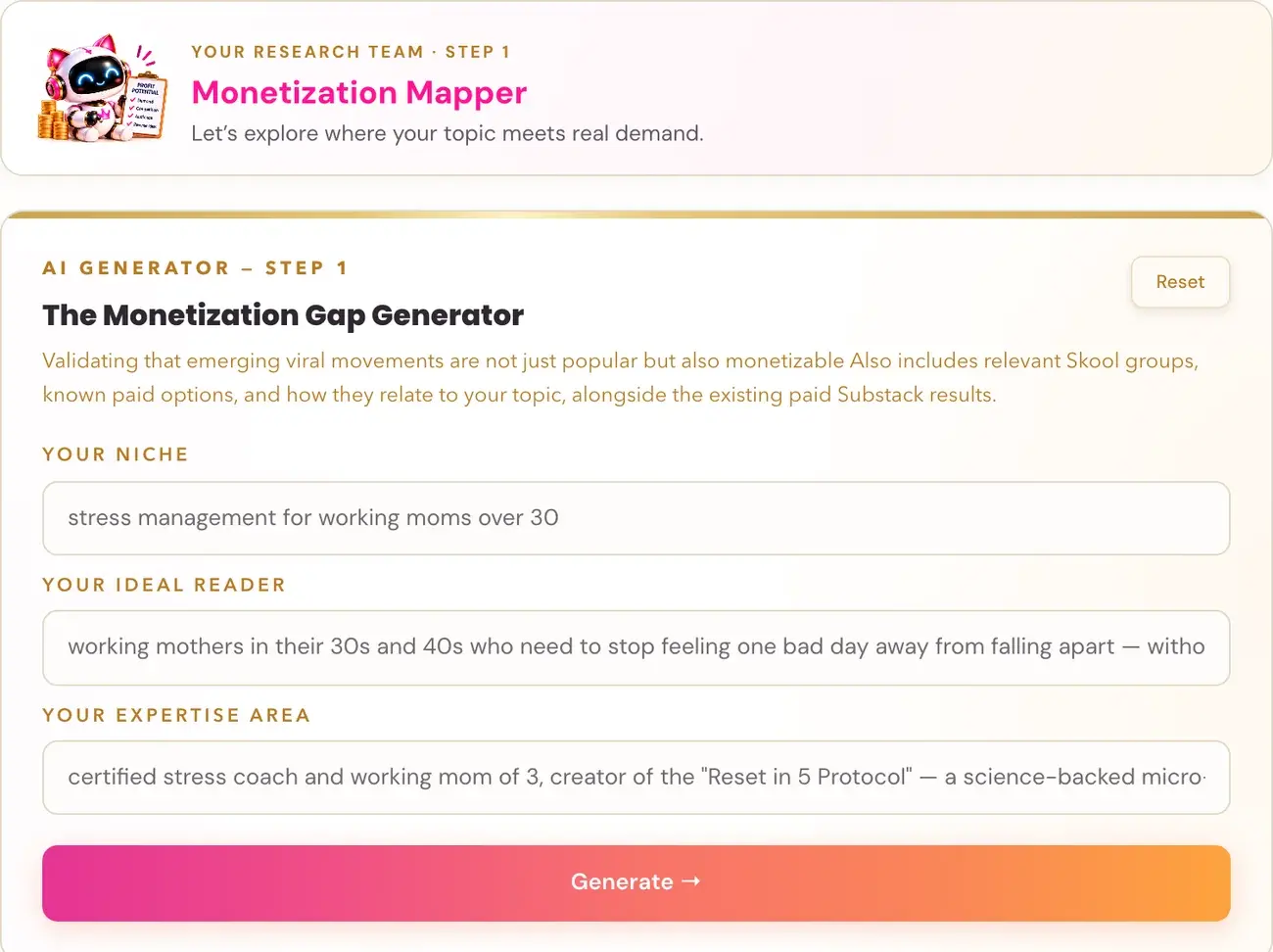
What the Generator Does
This is the fourth Step 1 generator, found in lesson 5, Finding Monetization Gaps. It answers a critical question: do people in this niche actually spend money, or do they simply consume free content? It looks for the paid products that already exist around your topic, namely Udemy courses and paid Substack newsletters, because those prove that the buying behaviour exists independently of books.
Both this generator and Final Validation retain all of their original outputs, including the paid Substack newsletters, and add a separate section of paid Skool groups, with real relevant group names, known paid-tier information, what members receive, and how each group relates to your book topic. It is delivered analysis, not an assignment: you do not need to research Skool yourself.
Generator 4 deliberately excludes Amazon books. That comes in Generator 5, the Final Validation. This generator is specifically about non-book paid products.
Why It Matters
This is the filter that saves months of wasted effort. The Monetization Gap Generator checks whether people actually buy on this topic, or whether they just watch YouTube and ask ChatGPT. A topic can have passionate fans and still be a poor publishing niche if its readers are not buyers. A topic can be passionate, popular and completely non-monetizable, and many authors assume otherwise without checking.
If you already know your topic, it is still worth running. Running this generator confirms that the niche is monetizable, something many students assume without ever testing.
There is also a bonus that students often miss. The paid newsletters in the report belong to writers who have engaged, paying audiences in exactly the niche you are targeting. They are potential collaboration and shoutout partners at launch, so bookmark them now. When you are ready to promote in Step 7 · LAUNCH, these writers are the first people to contact for shoutouts and features. Paid newsletter offers can suggest topics that people value, but they do not prove subscriber numbers or demand for your particular book.
What to Enter
The same three boxes as the first two generators.
- Your Niche.
- Your Ideal Reader.
- Your Expertise Area.
The Mom book was run with these inputs:
Your Niche: Overwhelmed working moms: guilt relief and practical stress management Your Ideal Reader: Working mothers in their 30s and 40s balancing demanding jobs and family, looking for short practical ways to manage guilt and burnout. Your Expertise Area: Stress-management coach and working mother of three, teaching five-minute recovery habits and practical work-family boundaries.
What You Receive
The report arrives in five sections.
- Udemy. Five real Udemy courses, which prove that people already pay to learn this topic.
- Paid Substack Newsletters. Three to five paid newsletters in your niche.
- Paid Skool Groups. Real relevant groups, whether they have a paid tier, what members pay to learn, and how each group relates to your topic. If examples are unavailable, the section is brief and simply means the examples were not available. It never means there is no demand.
- Monetization Verdict. A direct answer to the question: is this niche monetizable?
- Your Opportunity. Your specific opportunity angle, given your expertise.
Read the Monetization Verdict first, then see what your Opportunity angle suggests about how to position your book.
Using Your Results
The output is research and inspiration, not instruction. You can run the generator again to explore another angle or revise your inputs. Results may overlap or repeat, and every new run uses AI usage within your account's limits. To reread a report, reopen it from your saved results rather than generating again.
If Something Goes Wrong
- A connection error or HTTP 502 occasionally happens. Retry with the same inputs. If a completed report was saved, the same request retrieves it without another generation; if it is still being written, wait a minute and retry.
- The report is ready but saving failed. Copy the report, or keep the page open and use Retry saving. This does not run the generator again.
- The report failed its completeness checks. The app makes one repair attempt and keeps your previous reports safe. Retry once, and if it happens again email contact@goldenbestseller.com with the generator name and the error.
Example from the Mom Book
Section 1, Udemy
1. Stress Management for Working Mothers 2. Work Life Balance for Working Moms 3. Time Management for Working Moms 4. Parenting Skills: Stress Management for Parents 5. Overcoming Burnout for Women
Section 4, Monetization Verdict
Working mothers are actively paying for solutions to stress, burnout, and daily guilt. Paid courses like Stress Management for Working Mothers and successful paid newsletters prove that this audience spends money for reliable help. Mothers do not want heavy textbooks or hour-long classes that add to their workload. The existing spending in this topic proves a strong, high-intent market ready for simple, effective guidance.
Section 5, Your Opportunity
Your strongest angle: Five-minute micro-habits created to stop mom guilt instantly during busy workdays. Why your expertise wins here: Personal experience as a working mother of three combined with professional stress coaching builds instant trust and immediate real-world proof. Why now: Working mothers are experiencing unprecedented burnout and need fast, realistic boundaries that fit into packed daily schedules right now.
What to Do Next
Run the Final Validation Generator, the last filter before you commit to a topic. Bookmark the newsletters from this report: they become your first outreach list in Step 7.
Last checked in the app: October 14, 2026.
Still Need Help?
Inside the app, the Course Coach answers your questions and guides you step by step. You can also write to us and we will get back to you.
Contact Support