
The Audiobook Creator and Your Manuscript: How Your Book Becomes an Audiobook
The Audiobook Creator reads your manuscript from the Writing Studio. Click Audiobook on a book's card, pick a voice, and generate each chapter.
Your audiobook is made from the manuscript you wrote in the Writing Studio. Open the Audiobooks tab, pick a voice, and generate your book one chapter at a time.
How Does My Manuscript Get Into the Audiobook Creator?
You don't have to import or paste anything. The Audiobook Creator reads the book you have open:
- Open the My Books tab.
- On your book's card, click 🎙 Audiobook.
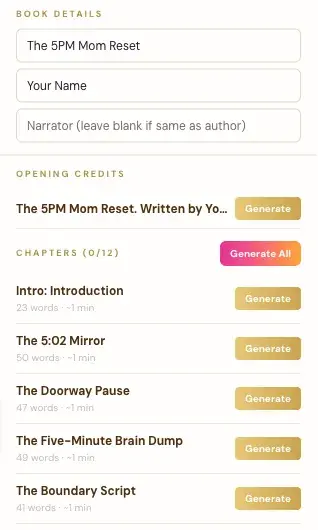
- The Audiobooks tab opens with your book's title, your author name and your chapters already filled in.
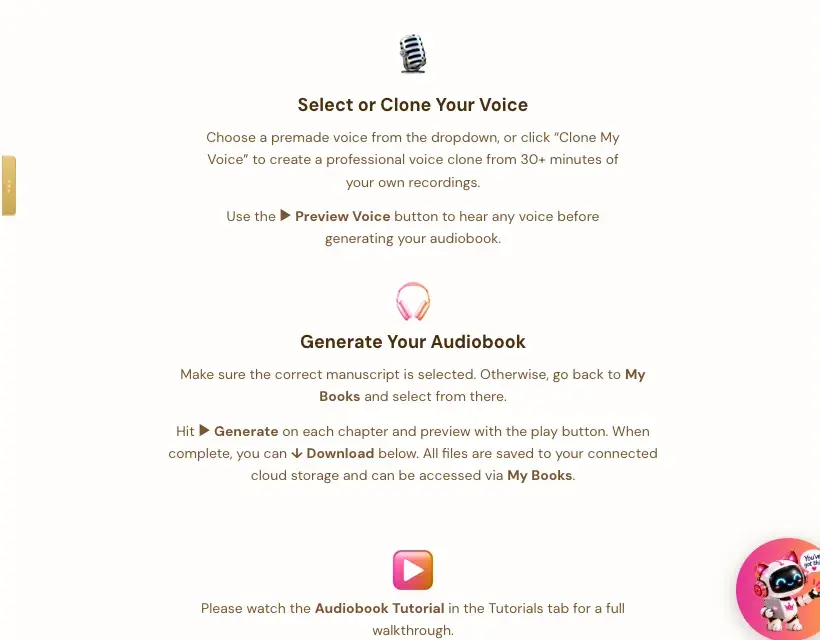
The app says it right on the page: "Make sure the correct manuscript is selected. Otherwise, go back to My Books and select from there."
What Does the Audiobook Creator Pull From My Book?
- Book Details: your title and author name from the manuscript. There's also a Narrator box. Leave it blank if the narrator is the same as the author.
- Opening Credits: a line like "The 5PM Mom Reset. Written by…", with its own Generate button.
- Chapters: one row for each intro section and each chapter in your manuscript, with its word count and about how many minutes it will run. The heading shows how many are done, like "Chapters (0/12)."
How Do I Make the Audio?
- Pick a voice from the dropdown, or click 🎤 Clone My Voice to make a voice clone from 30 or more minutes of your own recordings.
- Click ▶ Preview Voice to hear any voice before you start.
- Click ▶ Generate on each chapter, or Generate All.
- Preview each chapter with the play button, then ⬇ Download.
What Do I Need Before I Start?
The app asks for two connections:
- Your own ElevenLabs account and API key. ElevenLabs is a separate service with its own plans. Its Free plan doesn't allow audio through its API, so you need at least their Creator plan. Connecting your key takes a few seconds, and the app guides you.
- Your own storage: Google Drive, Dropbox or OneDrive. See Where Your Audiobook Files Go.
What If I Change My Manuscript Later?
If you edit a chapter after you've made its audio, generate that chapter again. A regenerated clip replaces the old one in your storage, so you don't get duplicates.
What Comes Next?
Read what the app says about Audible: Audible, ACX and Your Audiobook Files Explained. Not sure where to start? The Course Coach inside the app guides you through every step, so you're never stuck on a button.
Related Articles
Last checked in the app: October 14, 2026.
Still Need Help?
Inside the app, the Course Coach answers your questions and guides you step by step. You can also write to us and we will get back to you.
Contact Support