
How to Make Text Bold, Italic or Underlined in the Writing Studio
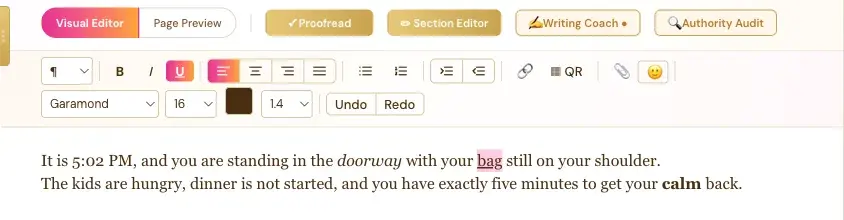
Select your words, then click B, I or U in the Visual Editor toolbar. Or use Ctrl+B, Ctrl+I and Ctrl+U.
Select the words you want to change, then click B for bold, I for italic or U for underline. Your changes show right away in the editor.
How Do I Make Text Bold in the Writing Studio?
- Select the word or words you want.
- Click B in the toolbar, or press Ctrl+B.
Click it again to take the bold off.
How Do I Make Text Italic?
Select your words and click I, or press Ctrl+I. Italic is great for a thought, a title or a word you want to lean on.
How Do I Underline Text?
Select your words and click U, or press Ctrl+U. The button lights up pink while your selection is underlined, so you always know it's on.
What Comes Next?
See every button in What Each Button in the Visual Editor Toolbar Does, or take the full tutorial, How to Format Your Text in the Writing Studio. Not sure where to start? The Course Coach inside the app guides you through every step, so you're never stuck on a button.
Related Articles
Last checked in the app: October 14, 2026.
Still Need Help?
Inside the app, the Course Coach answers your questions and guides you step by step. You can also write to us and we will get back to you.
Contact Support