
How to Connect Claude to the Writing Coach With Your Own API Key
Open the Writing Coach, click Connect Claude, create a key on Anthropic's website, paste it and click Save & Connect.
Connecting Claude takes a few seconds. You create your own key on Anthropic's website, paste it into the Writing Studio, and you're done. The app guides you through every click.
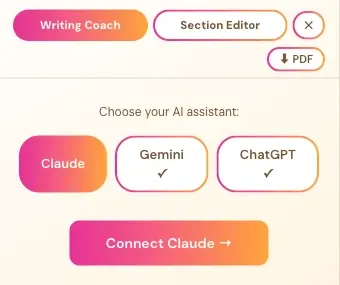
How Do I Open the Claude Connect Screen?
- In the Writing Studio, click Writing Coach.
- Under Choose your AI assistant, click Claude.
- Click Connect Claude →.
A checkmark ✓ under a name means that assistant is already connected.
What Do I Do in the Connect to Your Claude Window?
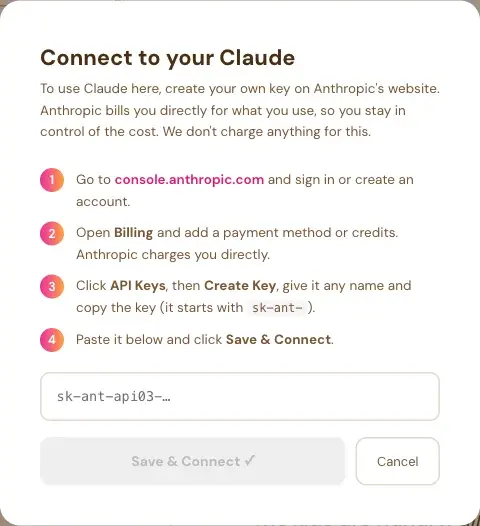
The window says: "To use Claude here, create your own key on Anthropic's website. Anthropic bills you directly for what you use, so you stay in control of the cost. We don't charge anything for this." Then it gives four steps:
- Go to console.anthropic.com and sign in or create an account.
- Open Billing and add a payment method or credits. Anthropic charges you directly.
- Click API Keys, then Create Key, give it any name and copy the key. It starts with `sk-ant-`.
- Paste it into the box and click Save & Connect.
The Save & Connect button stays grey until you paste a key. Cancel closes the window.
Will Claude Also Work in the Section Editor and Final Editor?
Yes. Whichever assistant you pick also becomes the default for the Section Editor and the Final Editor, and each of them has the same Claude, Gemini and ChatGPT switch.
Never paste your key into the Course Coach chat or into an email. Only paste it into the Save & Connect box inside the app.
What Comes Next?
Read How to Use the Writing Coach, or Connect Your API Key: It Takes a Few Seconds. Not sure where to start? The Course Coach inside the app guides you through every step, so you're never stuck on a button.
Related Articles
Last checked in the app: October 14, 2026.
Still Need Help?
Inside the app, the Course Coach answers your questions and guides you step by step. You can also write to us and we will get back to you.
Contact Support