
Connect Your AI Key in a Few Seconds
Connect your own Claude, Gemini or ChatGPT key in a few seconds. The app guides you step by step, and the cost is free or very small.
Quick Start
Connecting your own AI key is super easy. It takes only a few seconds, and the app guides you through every step. Using your own key is free or costs very little.
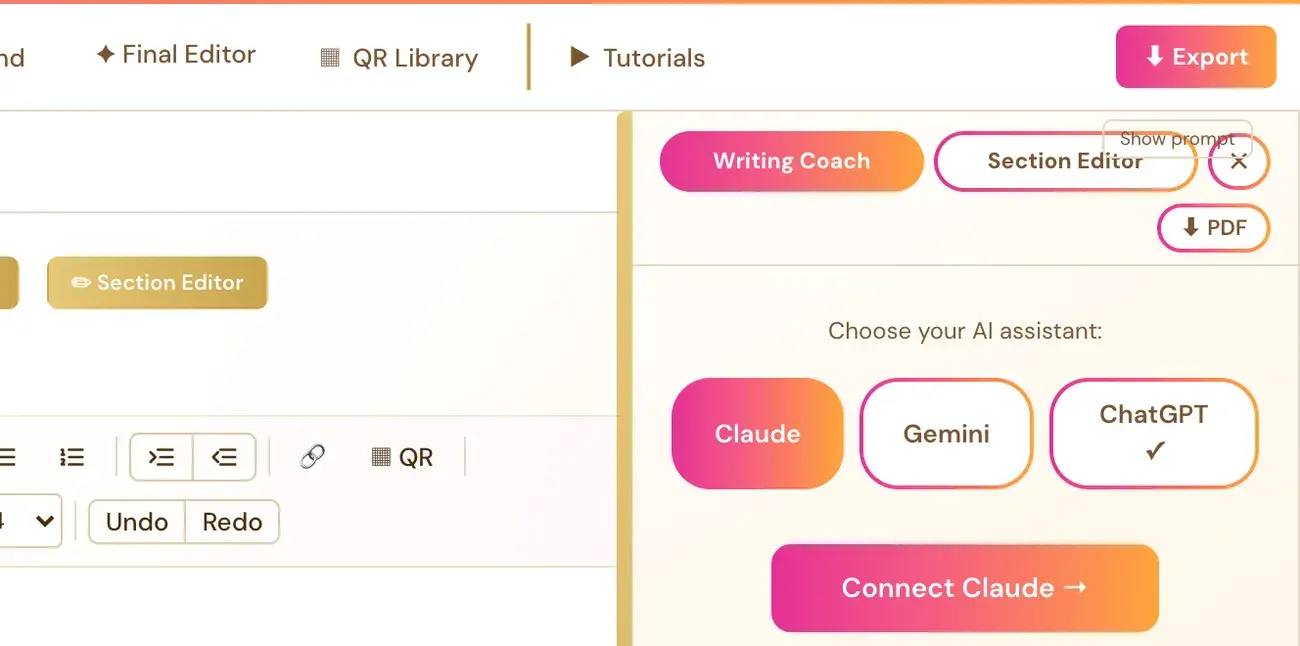
- In the Writing Studio, click Writing Coach ▼.
- Choose Claude, Gemini or ChatGPT, then click the connect button. It reads, for example, Connect Claude →.
- A setup panel opens. Follow its instructions to get your key from the AI company.
- Paste the key into the box in the app.
- Click Save & Connect ✓.
A small colored dot (●) on the Writing Coach button shows that a key is connected. You only need ONE key. Gemini is a good place to start because it has a free tier.
Full Guide
Step 1: Understand what the key is for
An AI key (also called an API key) is really just a personal password, like the key to your own front door. It lets the app talk directly to a company's AI on your own behalf, using your own account with that company. It is the same basic idea as giving an app permission to post to your Instagram, or letting your email app send messages using your own email address, just for AI instead.
You use your own key so that costs stay directly tied to what you actually use, instead of everyone paying a flat fee. The app saves the connected key with your account and uses it through its server to call the AI company you chose.
Step 2: Choose which AI to connect
The key powers three tools in the Writing Studio: the Writing Coach, the Section Editor and the Final Editor. You only need one connected key for all three.
| AI | Where you get the key | Cost |
|---|---|---|
| Gemini | aistudio.google.com | Free tier available |
| Claude | console.anthropic.com | Pay-as-you-go, no subscription |
| ChatGPT | platform.openai.com/api-keys | Pay-as-you-go, billing set up there |
Whichever you connect first is used in all three tools. Each tool has a Claude / Gemini / ChatGPT toggle, so you can connect more than one and switch any time.
Gemini is also the key used by the course generators. Eligible tools can first use the app's shared welcome credit, and when a connection is needed a Connect your Gemini Key prompt appears. Full-book translation needs your own Gemini connection.
Step 3: Open the connect window
You can reach it two ways.
- From the Writing Studio: Click Writing Coach ▼, then Connect Claude →, Connect Gemini → or Connect ChatGPT →.
- From your profile: Click your profile picture at the top right, then Connected Services.
Step 4: Get a Gemini key
Get a key free at aistudio.google.com. Follow the instructions in the setup panel, then paste the key into the box in the app and click Save & Connect ✓.
Google offers a free Gemini API tier, but the request and token quotas depend on your model and your Google project, so a whole manuscript is not promised to fit inside it. If you reach the limit, it resets within 24 hours, or you can add billing on Google's side. That is optional. Paid Gemini API billing is different from a paid Gemini chat subscription.
Step 5: Get a Claude key
Get a key at console.anthropic.com. Follow the instructions in the setup panel, then paste the key into the box in the app and click Save & Connect ✓.
Claude is pay-as-you-go. It is not a monthly subscription, so there is no plan to sign up for, no recurring charge and nothing to cancel. You are only charged for the amount you actually use, billed directly by Anthropic to your own account. The model used is Claude Sonnet 5.
Step 6: Get a ChatGPT key
A ChatGPT Plus or Pro subscription is separate from an API key and does not work here. You use your own OpenAI API key from platform.openai.com/api-keys, with billing set up there. Follow the instructions in the setup panel, then paste the key into the box in the app and click Save & Connect ✓.
OpenAI bills API use separately and pay-as-you-go. The model used is GPT-6.1 Sol. Read more in Can I use my ChatGPT subscription instead of an API key?
Step 7: Check that it worked
After you click Save & Connect ✓, the Writing Coach button shows a small colored dot (●). Now the Writing Coach can see your current section and its Writer's Prompt and give specific feedback.
Step 8: Keep your key safe
Never paste your key into the Course Coach chat or an email. Paste it only into the Save & Connect box inside the app. The Course Coach never asks for it.
Step 9: Know the one exception
Audiobook narration uses ElevenLabs. That is a separate key, and ElevenLabs has its own cost, because its free plan does not allow API access to generate audio. Every other AI key above is free or very low cost. The Category Scout tool in Step 7 · LAUNCH may also show a Connect your Scraper Key pop-up. That is a free key from ScraperAPI, a completely different key from your AI keys, used only for Category Scout and never required anywhere else in the course.
Step 10: See what you have used
Click your profile picture and choose API Usage, listed right under Connected Services. It shows your own real token counts and estimated dollar cost for each generator, starting with the current billing cycle, with an All Time option to see everything since you started. This is your own data, not a company-wide number.
Troubleshooting
I cannot find the Connect button. In the Writing Studio, click Writing Coach ▼ and the connect buttons are there. You can also click your profile picture at the top right, then Connected Services.
It says my key is invalid or lacks permission. Follow the wording of that exact message. See How do I change or remove my AI key?
It says my key works but I need credits. That is a message about the AI company's account, not a problem with the app. The Writing Coach panel links to that company's billing page. See What do I do if my AI says I am out of credits?
It says Gemini's free limit was reached. This is Google's own free-tier usage limit for the moment, not a fee from us. It resets on its own within 24 hours, or you can add billing at aistudio.google.com. Adding billing is optional.
It says the AI is busy. A busy or at-capacity message is an availability error, not proof that your key is wrong. Wait about a minute and try once more. If it keeps happening, contact contact@goldenbestseller.com.
I want to use a ChatGPT subscription. A subscription does not work on its own. Connect an API key instead, or choose Claude or Gemini.
Where is my key stored? It is saved with your account and used through the app's server. It is not stored only in your browser.
Where to Go Next
Learn what each key costs in What does my AI key cost?. See the quick overview in Connect your AI key, or return to the Quick Start Guide. Not sure where to start? The Course Coach inside the app helps you every step of the way.
Related Tutorials
Last checked in the app: October 14, 2026.
Still Need Help?
Inside the app, the Course Coach answers your questions and guides you step by step. You can also write to us and we will get back to you.
Contact Support