
Step 2 · PLAN: Plan Your Book With the Book Planner
Where do you want this book to take your reader, and you? Plan it step by step with the Book Planner and finish with a complete Book Blueprint.
Where do you want this book to take your reader, and you? Step 2 is where your book becomes truly yours. In the Book Planner App you plan it in conversation, one question at a time, and finish with your complete Book Blueprint, the plan that feeds every generator after it.
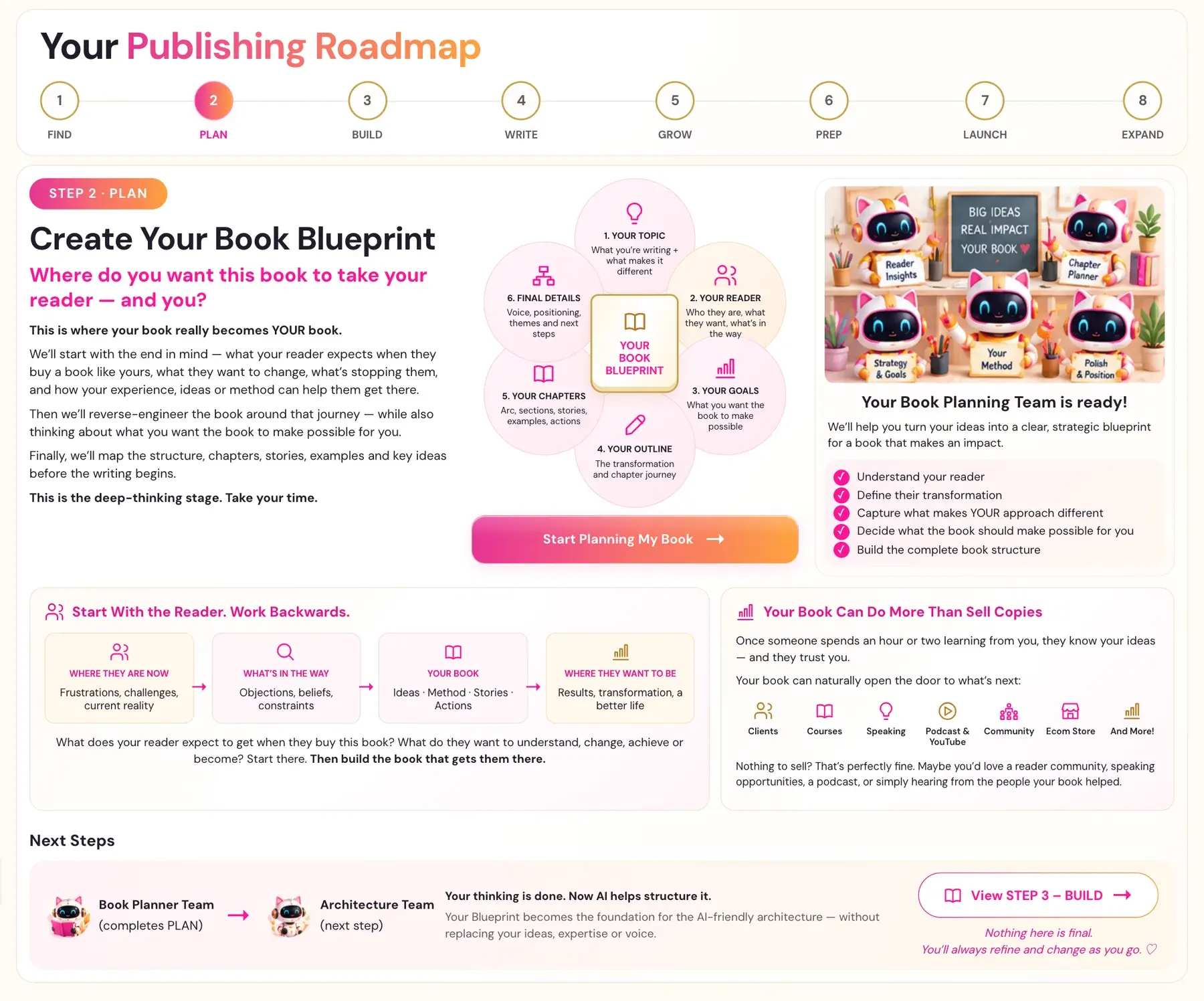
What Is the Book Planner App?
The Book Planner App is a guided AI conversation. It asks about your book, and your answers become the plan behind it. It begins by clarifying your topic. From there it works through your reader, your goals, your outline and your chapters, and it finishes with the details readers use to find your book.
This is the deep-thinking stage, so take your time with it. It is the most important document in the course, and the more thought you give it here, the better every generator that follows will work for you. Many authors spend a few days on it, and that is time well spent.
The Six Parts, in Order
1. Your Topic. You begin by clarifying what your book is about, in a short paragraph, with a working title if you have one. You then say what makes your book different from others on the same topic: your angle, your method or your experience. You also write your elevator pitch, a one-sentence summary of what the book does for the reader.
2. Your Reader. Here you start with the end in mind. Picture a specific person, give them a name, and ask what they expect when they buy a book like yours. What are their biggest pain points? What story do they tell themselves about why they cannot fix this? What do they want to change, and who will they become after reading your book? Think of four points: where your reader is now, what is in their way, your book, and where they want to be. Then build the book that takes them there.
3. Your Goals. Your book can do more than sell copies. After an hour or two with you, a reader knows your ideas and trusts you, so your book can open the door to whatever comes next: clients, courses, speaking, a podcast or YouTube channel, a community, a store and more. You choose what you want the book to achieve for you. If you have nothing to sell, that is perfectly fine. You might simply love to build a reader community, be invited to speak, or hear from the people your book has helped.
4. Your Outline. You decide how many chapters the book will have, what kind of book it is, whether it has a named method or framework, and which ten expert terms must appear in it.
5. Your Chapters. The planner goes through your book chapter by chapter. For each one you give the title and what it covers, what the reader will know or be able to do afterwards, and the search phrases someone would type to find that content. The structure, the stories, the examples and the key ideas are all mapped before you write a word.
6. Final Details. You describe how your reader searches on Amazon, and the planner wraps up and generates your Blueprint.
Every question is set out in The Six Parts of the Book Planner.
How to Begin
Click Start Planning My Book → on the Step 2 Roadmap page, or choose The Book Planner App under STEP 2 · PLAN in the left sidebar. For a full walkthrough, see How to Use the Book Planner.
Nothing here is final, and you can refine your answers as you go.
What Comes Next
Your thinking is done, and now AI helps to structure it. Your Blueprint becomes the foundation of the AI-friendly architecture in Step 3 · BUILD, without replacing your ideas, your expertise or your voice. Your Book Planning Team completes PLAN and hands over to the Architecture Team.
Complete your Book Planner before you run any Step 3 generator. The app does not require it, but everything in Step 3 builds on your Blueprint.
Common Questions
Do I have to answer every question perfectly? No. Nothing is final. The Book Planner is a first roadmap, not your finished manuscript. Give your best current thinking, keep moving, and refine as your ideas develop.
I write fiction. Can I use the Book Planner? The Book Planner, the Blueprint and the Knowledge Graph tools in Step 3 are built for non-fiction expertise and authority books. They map a real reader problem to the author's method, which does not translate cleanly to a novel's plot and characters, so results for fiction may be inconsistent. You are welcome to try it anyway. The Writing Studio, Global Book Translation, the Audiobook Creator and Step 5 · GROW work for any genre, and they work beautifully for fiction exactly as they are.
Last checked in the app: October 14, 2026.
Still Need Help?
Inside the app, the Course Coach answers your questions and guides you step by step. You can also write to us and we will get back to you.
Contact Support