
How to Connect Your AI Key
Click Writing Coach, choose Claude, Gemini or ChatGPT, then click Connect. It takes a few seconds, and the app guides you through each step.
Open the Writing Coach, choose Claude, Gemini or ChatGPT, and click the Connect button for that choice. Connecting your own AI key is super easy. It takes only a few seconds, the app guides you through it step by step, and using your own key is free or costs very little.
What is an AI key?
An AI key (also called an API key) is really just a personal password, like the key to your own front door. It lets the app talk directly to a company's AI (such as Google's, Anthropic's or OpenAI's) on your own behalf, using your own account with that company. It is the same basic idea as giving an app permission to post to your Instagram, or letting your email app send messages using your own email address, just for AI instead. The app saves the connected key with your account and uses it through its server to call the AI company you chose.
You get your own key because it keeps costs directly tied to what you actually use, instead of everyone paying a flat fee for something some people use a little and others use a lot. It is completely normal to feel a bit lost the first time, and it is totally fine to ask the Course Coach follow-up questions.
Which key do I need?
- Gemini: Used by the course generators. Eligible tools can first use the app's shared welcome credit. When a connection is needed, a Connect your Gemini Key prompt appears. Full-book translation needs your own Gemini connection.
- Claude, Gemini or ChatGPT: Any one of these powers the Writing Coach, the Section Editor and the Final Editor. You only need one. Whichever you connect first is used in all three, and each tool has a toggle so you can switch later. Claude is not an option for any other generator in the course. Those are Gemini-only.
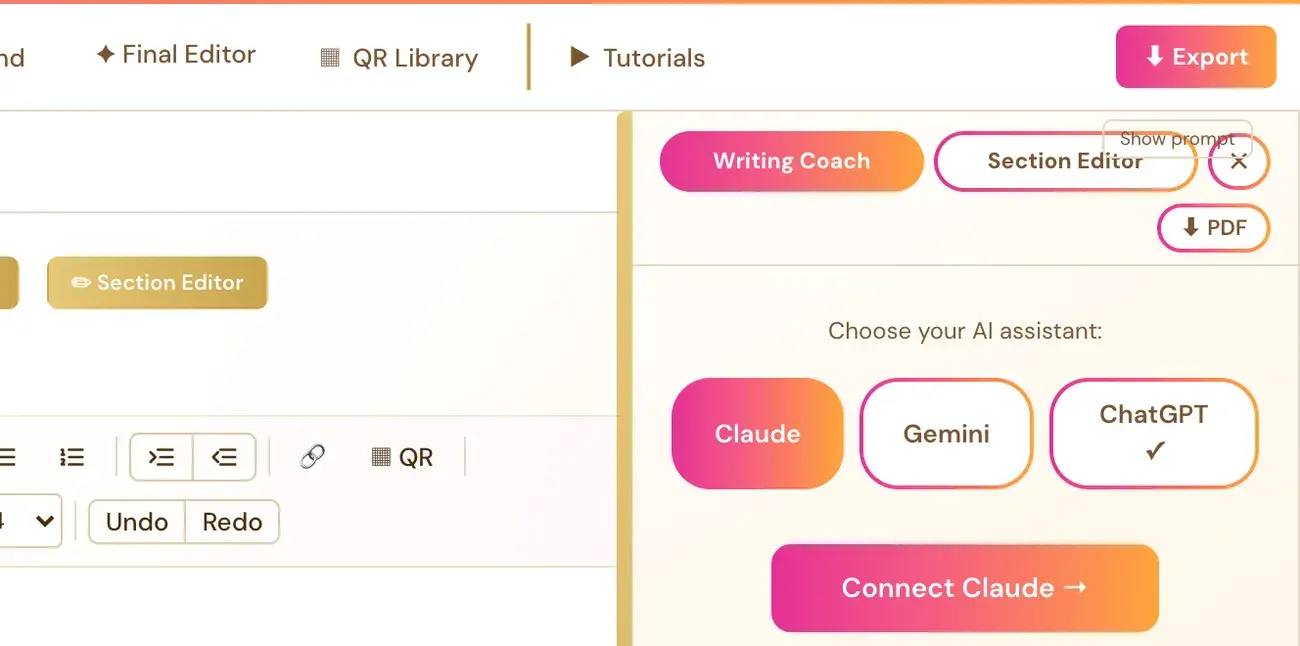
How do I connect a key from the Writing Studio?
- Click Writing Coach ▼ in the Visual Editor.
- Choose your AI: Connect Claude →, Connect Gemini → or Connect ChatGPT →. This opens a setup panel.
- Follow the instructions in the panel to get a key from Anthropic, Google or OpenAI.
- Paste the key into the box and click Save & Connect ✓.
When a key is connected, the Writing Coach button shows a small colored dot (●). Once connected, the Writing Coach sees your current section and its Writer's Prompt and can give specific feedback. This is a one-time setup.
How do I connect a key from my profile?
Click your profile picture at the top right, then Connected Services. This is also where you connect your Gemini key when a Connect your Gemini Key prompt asks for one.
Where do I get each key?
- Claude: console.anthropic.com. The model used is Claude Sonnet 5.
- Gemini: aistudio.google.com, which has a free tier. The model used is Gemini Flash.
- ChatGPT: platform.openai.com/api-keys, with billing set up there. The model used is GPT-6.1 Sol.
Step-by-step instructions for all three are in Connect Your AI Key: It Takes a Few Seconds.
Never paste your key into the Course Coach chat or into an email. Only paste it into the Save & Connect box inside the app.
Do I need a key for the Audiobook Creator?
Audiobook narration uses ElevenLabs, which is a separate third-party service with its own cost and a separate key. That is the one exception to the "free or very little" rule. ElevenLabs' Free plan does not allow API access to generate audio, so a paid plan is needed. You paste the key into the Connect ElevenLabs panel in the Audiobooks tab. The "Connecting with 11Labs" video under the Tutorials tab walks through every click.
Not sure where to start? The Course Coach inside the app helps you every step of the way.
Related Articles
Last checked in the app: October 14, 2026.
Still Need Help?
Inside the app, the Course Coach answers your questions and guides you step by step. You can also write to us and we will get back to you.
Contact Support