
Writer's Prompt Missing: How to Get It Back
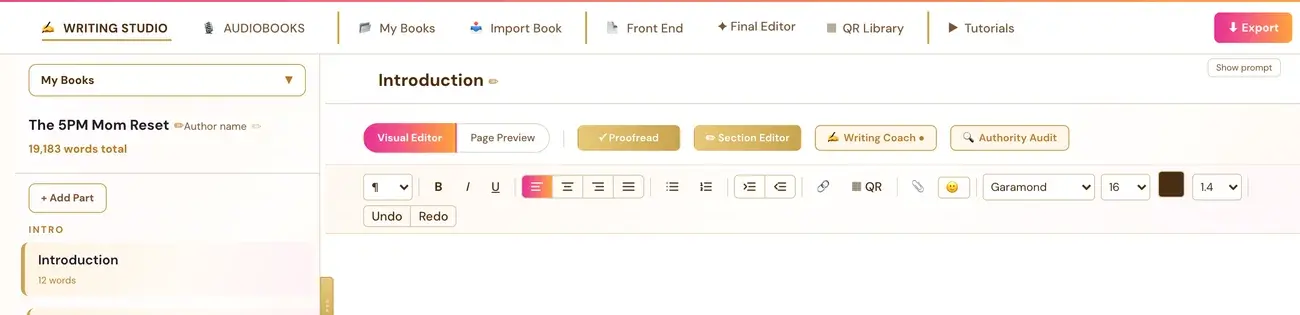
Click Show prompt at the top right of the editor. If there is no prompt, run the Chapter Detail Generator for that section first.
Click "Show prompt" at the top right of the editor area. If there is no prompt, it means the Chapter Detail Generator (Step 3 · BUILD) has not been run for that section yet.
What is the Writer's Prompt?
It is the AI-generated guidance for that specific section, pulled from the Chapter Detail Generator (Step 3 · BUILD). In Step 4 · WRITE the roadmap calls it the Writing Prompt: "Guidance inside each section." The Goal line, shown in italics after "The Goal:", is the specific objective for that section.
Why can't I see it?
There are two reasons.
- You hid it. The Hide prompt choice is remembered per book. Once you hide the prompt, it stays hidden for that book every time you come back, until you click Show prompt again. This is expected, not a bug.
- There is no prompt yet. If the Chapter Detail Generator has not been run for that section, there is no prompt.
How do I show it again?
- Open the Writing Studio tab and select the section.
- Click Show prompt at the top right of the editor area.
How do I create the prompt?
- Go to the generators and run the Chapter Detail Generator (Step 3 · BUILD). Keep the page open while it works.
- Bring the outline into the Writing Studio. There are two ways:
- - Click through directly from the Chapter Detail Generator right after generating. This applies the new outline immediately and prompts for a working title.
- - In My Books, click + Pull Latest Outline. If you have more than one Project set up (My Projects), it opens a dropdown so you pick which project's outline to pull. Or, if the current book has no outline yet, use Pull latest outline in the Chapters panel. Paste outline lets you paste one in manually.
- Return to your section. The prompt appears.
A book of more than 30 chapters is built in parts of about 12 chapters each. If one part does not finish, the parts already built are kept and clicking Generate again continues from the failed part instead of starting over.
Can I get more room on a phone?
Yes. Hide prompt removes the writer's prompt panel and gives you more room. You can show it again at any time with Show prompt.
Does the prompt write my chapter?
In the roadmap's Step 4 · WRITE, the Writing Prompt is "Guidance inside each section," and Your Draft is "Write, dictate, or get AI help." The Chapter Detail Generator creates writing directions for the author, not drafted stories, scenes, dialogue or narrative. You bring the book. Your Writing Team helps with the heavy lifting.
Not sure where to start? The Course Coach inside the app guides you through each step, so you are never stuck on a button.
Related Articles
Last checked in the app: October 14, 2026.
Still Need Help?
Inside the app, the Course Coach answers your questions and guides you step by step. You can also write to us and we will get back to you.
Contact Support