
How to Create a New Book in the Writing Studio
Click + Create New Book in My Books, add a working title, your author name and a language, then click Save & continue.
Want to start a fresh book? Open the My Books tab, click + Create New Book, and fill in the naming window. Your new book opens, ready for you to write.

How Do I Create a New Book?
- Click the My Books tab at the top of the Writing Studio.
- Click + Create New Book.
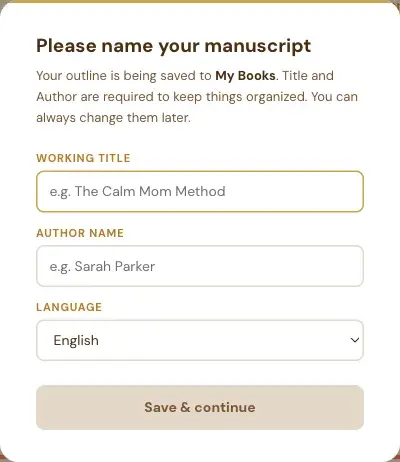
- In the window Please name your manuscript, fill in your Working title, your Author name and your Language.
- Click Save & continue.
Why Does It Ask for a Title and an Author?
The window says it plainly: "Title and Author are required to keep things organized. You can always change them later." So a working title is fine. It doesn't have to be final.
Can I Close the Naming Window Without Filling It In?
No. This window is on purpose: it has no Cancel button, and Escape doesn't close it. Fill in a working title and your name, and you can change both later.
What Happens After I Save?
Your new book opens in the Writing Studio, with no chapters yet. You then choose how to fill it. See How to Start a Blank Book and Add Chapters.
What If I Haven't Connected Storage Yet?
The first time you create or import a book, the app asks you to choose where to keep a backup copy: Google Drive, Dropbox, OneDrive or your own computer. See How to Connect Cloud Storage.
What Comes Next?
See what each card in My Books does in The My Books Tab Explained. Not sure where to start? The Course Coach inside the app guides you through every step, so you're never stuck on a button.
Related Articles
Last checked in the app: October 14, 2026.
Still Need Help?
Inside the app, the Course Coach answers your questions and guides you step by step. You can also write to us and we will get back to you.
Contact Support