
The My Books Tab Explained: Every Button on a Book Card
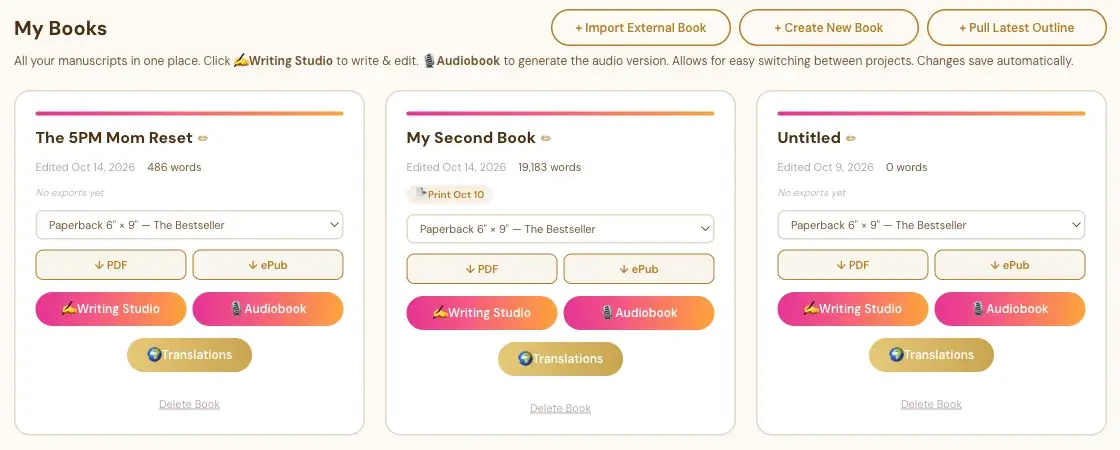
Each book has a card with its title, word count, export dates, PDF and ePub downloads, and buttons for the Writing Studio, Audiobook and Translations.
The My Books tab shows every manuscript you have as its own card. Each card tells you how the book is doing and gives you the buttons to keep working on it.
What Is on a Book Card?
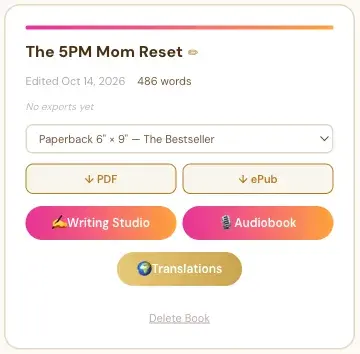
From top to bottom:
- The title. The pencil next to it is for editing.
- When it was last edited, and the word count.
- Export badges. After you export, a small badge shows the date, like "Print Oct 10" or "eBook Oct 1". A book you haven't exported says "No exports yet."
- The size menu. It shows the PDF size for the book, like "Paperback 6" × 9" — The Bestseller."
- ↓ PDF and ↓ ePub. They download your book as a PDF or an ePub.
- ✍ Writing Studio. Opens the book so you can write and edit.
- 🎙 Audiobook. Opens the Audiobooks tab for this book. See The Audiobook Creator and Your Manuscript.
- 🌍 Translations. Opens the translations for this book. A translated book shows 📝 Translator's Notes here instead.
- Delete Book. Removes the book for good, after you confirm. See How to Delete a Book.
What Are the Three Buttons at the Top?
- + Import External Book: for a book you already wrote in Word or ePub. See How to Import a Word or ePub File.
- + Create New Book: a blank book. See How to Create a New Book.
- + Pull Latest Outline: brings in your most recent outline from the Chapter Detail Generator. See How to Pull Your Outline Into the Writing Studio.
Do My Changes Save Automatically?
Yes. The tab says it right at the top: "Changes save automatically."
What Comes Next?
For switching between books, see How to Work on More Than One Book. Not sure where to start? The Course Coach inside the app guides you through every step, so you're never stuck on a button.
Related Articles
Last checked in the app: October 14, 2026.
Still Need Help?
Inside the app, the Course Coach answers your questions and guides you step by step. You can also write to us and we will get back to you.
Contact Support