
How to Set Up the Audiobook Creator
Connect your ElevenLabs key and your own cloud storage once, then choose a voice. ElevenLabs has its own cost and requires the Creator plan or higher.
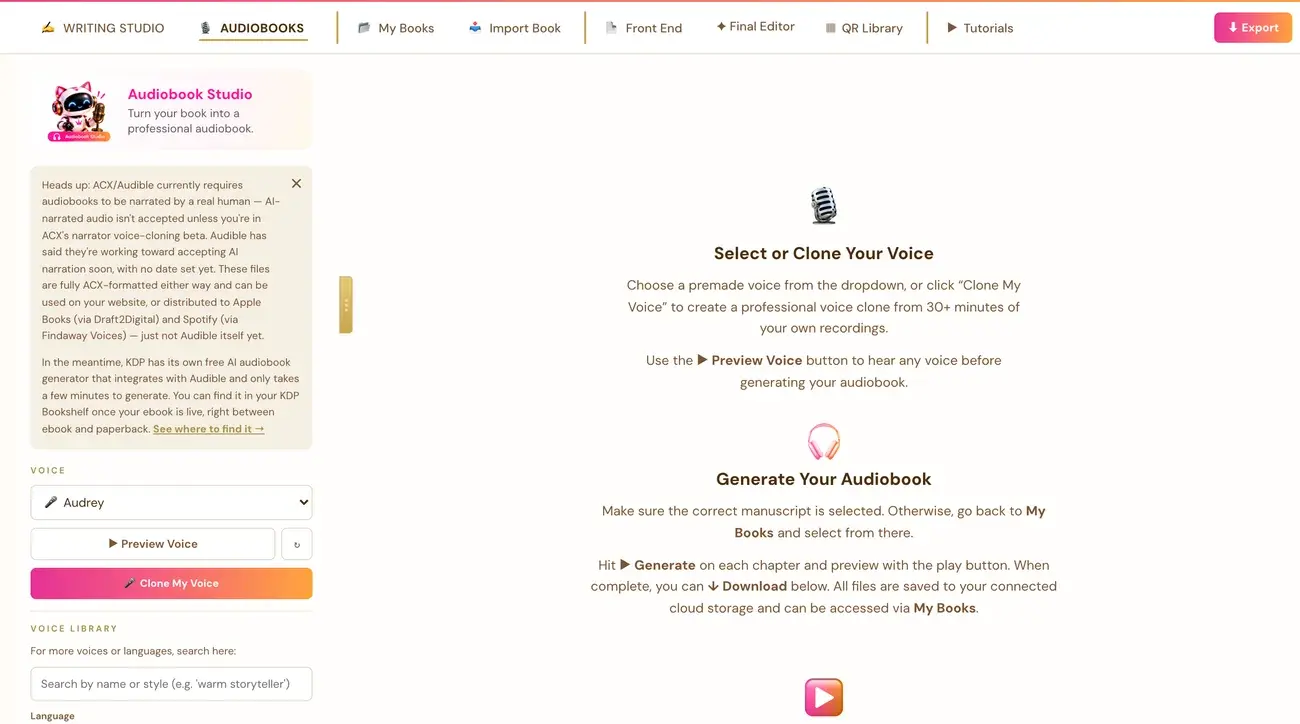
Open the Audiobooks tab at the top of the Writing Studio, connect your ElevenLabs key, connect your own cloud storage, then pick a voice. ElevenLabs is a separate company with its own cost, and it requires the Creator plan or higher.
What does ElevenLabs cost?
The Audiobook Creator converts your manuscript into a narrated audiobook using ElevenLabs AI voices. It uses the very latest ElevenLabs voice model automatically, so there is nothing for you to choose or turn on. ElevenLabs is a separate third-party service that we do not run, so you need your own ElevenLabs account and API key. ElevenLabs has its own cost, which is separate from the AI key used by the rest of the app.
ElevenLabs' Free plan does not allow API access to generate audio at all, whether you use a cloned voice or one of their own built-in voices. You need at least the Creator plan on elevenlabs.io, so you do not set everything up correctly and then reach a paywall at the very last step. We do not quote a price, because ElevenLabs sets it.
It is a recurring subscription, not a one-time purchase. If your book needs more credits than one billing cycle provides, you stay subscribed through the next billing cycle and pick up exactly where you left off. Nothing already generated is lost. You can cancel any time once you are done.
How do I connect ElevenLabs?
Connecting is super easy, takes only a few seconds once you have the key, and the app guides you through it step by step. There is also a video called Connecting with 11Labs in the Tutorials tab at the top of the Writing Studio that walks through every click, and a general Audiobook Tutorial video that covers the rest of the tool. Watch them first if you can.
- Go to elevenlabs.io/app/settings/api-keys and click Create API Key.
- Turn Restrict Key on, and set exactly these four permissions: Text to Speech to Access, Voices to Write, Voice Generation to Access, and Models to Access. Everything else stays at No Access.
- Paste the key into the Connect ElevenLabs panel in the Audiobooks tab.
The four permissions are required, not optional. A key without exactly these four permissions will fail. If a key with exactly those permissions still does not work, the fallback is to turn Restrict Key off entirely, which gives the key full access and rules out a permissions mismatch for good.
Your key is saved to your account, so it works across devices. Never paste your key into a chat or an email.
Why does it ask me to connect cloud storage?
Generating any audio (a chapter, the opening and closing credits, or the retail sample) also requires you to have connected one of your own Google Drive, Dropbox or OneDrive accounts. This is separate from the ElevenLabs key, and both are required.
Every generated audio file is saved directly into your own connected storage, never onto our servers. This is by design, so you always own and can reach your audio files independently of this app.
If storage is not connected yet, clicking Generate opens a Choose your storage platform screen. Pick Google Drive, Dropbox or OneDrive and sign in. It only asks once, and every future audio generation for any book uses that same connection. There is a × in the corner if you want to back out and come back to it later. See How do I connect cloud storage?.
Files are saved inside a Golden Bestseller Empire folder that the app creates once in your storage, then a subfolder named after that exact book, then an Audio subfolder inside it. This is automatic. If you generate a clip again, the new version replaces the old one and does not pile up as a duplicate.
How do I start making the audiobook?
- Pick your book in My Books, then click its Audiobook button. Make sure the right manuscript is selected.
- Choose a voice from the Select a voice... dropdown near the top of the Audiobooks tab. The chapter Generate buttons and Generate All stay disabled until a voice is selected. This is expected. See How do I choose or clone a voice?.
- Click Generate for each chapter, or Generate All. Then use the play button to listen and the download button for each chapter.
Once an ElevenLabs key is connected and no clip has been generated yet, the right side of the Audiobooks tab shows a Select or Clone Your Voice guide, and once a voice is picked, a Generate Your Audiobook guide below it. Once you have generated at least one clip, this text is replaced by the Voice Settings controls.
What do the error messages mean?
- This key isn't a valid ElevenLabs API key. The key was mistyped or cut off when copying. Copy the whole key again. This is not a permissions or subscription issue.
- Limited permissions, or the key doesn't have the permissions this needs. The key is real but missing one of the four required permissions. This is not about your ElevenLabs subscription or plan. Create a fresh key with all four permissions set, or turn off Restrict Key as a fallback.
- Run out of characters or credits, or quota. Your ElevenLabs account itself is out of usage for the billing period. This is a billing matter on ElevenLabs' side, not a bug here. Upgrade your ElevenLabs plan or wait for it to reset.
- Temporarily limiting requests. Nothing is wrong with your key. ElevenLabs is busy. Wait a minute or two and try again.
- output_format_not_allowed, or only available on the Creator tier and above. ElevenLabs' Free plan does not allow API access to generate audio at all. Upgrade to ElevenLabs' Creator plan or higher.
For any other message, email contact@goldenbestseller.com with the exact error text shown.
Not sure where to start? The Course Coach inside the app guides you through each step, so you are never stuck on a button.
Related Articles
Last checked in the app: October 14, 2026.
Still Need Help?
Inside the app, the Course Coach answers your questions and guides you step by step. You can also write to us and we will get back to you.
Contact Support