
What Step 8 Expand Is and What Is Inside It
Step 8 Expand takes your live book further with translations, an audiobook, Amazon ads and a series. Here is what each lesson does.
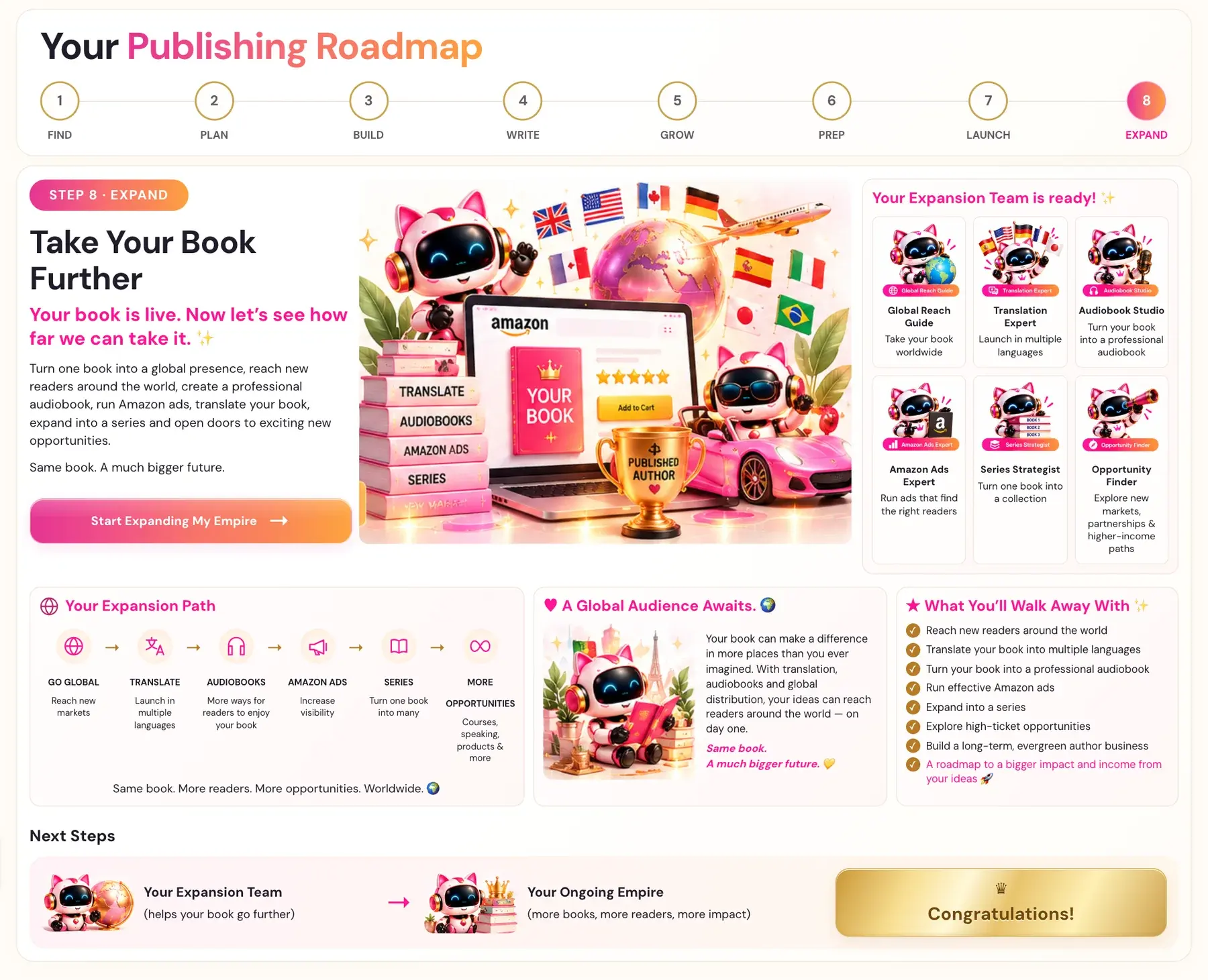
Step 8 · EXPAND is the last step of the course. It starts from "Your book is live. Now let's see how far we can take it." It turns one book into a global presence. Click Start Expanding My Empire to begin.
What is Step 8 · EXPAND?
Turn one book into a global presence, reach new readers around the world, create a professional audiobook, run Amazon ads, translate your book, expand into a series and open doors to exciting new opportunities." The heading of the step is "Take Your Book Further", and the promise is: "Same book. A much bigger future.
Your Expansion Team is ready:
- Global Reach Guide helps you take your book worldwide.
- Translation Expert helps you launch in multiple languages.
- Audiobook Studio turns your book into a professional audiobook.
- Amazon Ads Expert helps you run ads that find the right readers.
- Series Strategist helps you turn one book into a collection.
- Opportunity Finder helps you explore new markets, partnerships and higher-income paths.
What is the Expansion Path?
Your Expansion Path runs in this order:
- GO GLOBAL: reach new markets.
- TRANSLATE: launch in multiple languages.
- AUDIOBOOKS: more ways for readers to enjoy your book.
- AMAZON ADS: increase visibility.
- SERIES: turn one book into many.
- MORE OPPORTUNITIES: courses, speaking, products and more.
"Same book. More readers. More opportunities. Worldwide."
Which lessons have a tool and which are video only?
Some lessons have an AI generator under the video. Others are strategy and instructional video lessons with no generator attached.
| Lesson | What it covers | Tool or video |
|---|---|---|
| Amazon Ads (Lesson 1) | Amazon Ads - The Evergreen Fuel | Amazon Ads Keyword Generator and Campaign Strategy Generator |
| Global Book Translation Prep (Lesson 2) | Your Knowledge Graph and Big Promise in another language | KG + Big Promise Localization Generator and Localized Author Bio |
| Global Book Translator (Lesson 3) | Your title and your full book in another language | Title Localizer (main tab) and Global Book Translation Generator (second tab) |
| Sales Page Translation Generator (Lesson 4) | Your sales page in another language | Four tabs: Book Description, A+ Content, 7 Backend Keywords and Category Scout |
| Amazon Ads Translation Generator (Lesson 5) | Your Amazon Ads Keyword Generator output in another language | Amazon Ads Translation Generator |
| Expand to a Series (Lesson 6) | Series strategy | Video only |
| The Authority Outreach Generator (Lesson 7) | Getting listed on trusted organizations' recommended reading pages | Authority Outreach Generator |
| Evergreen Recommendations (Lesson 8) | Strategy lesson | Video only |
| Promos, Awards & Professional Reviews (Lesson 9) | Strategy lesson | Video only |
| High Ticket Funnels (Lesson 10) | Strategy lesson | Video only |
If a lesson shows nothing below the video, that lesson has no generator. Rewatch the lesson video for the specific strategy being taught.
What does "translocate" mean in the translation lessons?
Every localization generator in the course does not do word-for-word translation. It "translocates": it rewrites the content the way a real native speaker in that country would actually say it, using natural phrasing, idioms and the search language a local reader actually types and speaks. If a localized result is not a direct translation of what you wrote in English, that is intentional and correct.
Every localization generator has two dropdowns. Target Language lists the languages Amazon supports across its real international stores. Target Country / Amazon Store then only shows the real Amazon marketplaces that serve the chosen language. For example, Spanish shows only Spain (amazon.es) and Mexico (amazon.com.mx), and Portuguese shows only Brazil (amazon.com.br), because Amazon has no separate Portugal store.
In what order should I do the translation lessons?
- The KG + Big Promise Localization Generator (Lesson 2) must be run first. It takes your finished English Knowledge Graph and Big Promise and translocates the full 18-node graph and Big Promise into the target language. Everything else in the localization lessons depends on its output.
- Title Localizer (Lesson 3, main tab).
- The Global Book Translation Generator (Lesson 3, second tab). It needs a Title Localizer result for the same language first.
- The Sales Page Translation Generator tabs (Lesson 4). They do not depend on steps 2 or 3 and can be done any time once step 1 is complete.
- The Amazon Ads Translation Generator (Lesson 5). It does not depend on steps 2 to 4, but it needs your Amazon Ads Keyword Generator output from Lesson 1, because it translocates that output instead of generating from scratch.
Where do audiobooks fit in?
The Audiobook Creator lives in the Audiobooks tab at the top of the Writing Studio. See How do I set up the Audiobook Creator?.
What do I walk away with?
From the roadmap:
- Reach new readers around the world.
- Translate your book into multiple languages.
- Turn your book into a professional audiobook.
- Run effective Amazon ads.
- Expand into a series.
- Explore high-ticket opportunities.
- Build a long-term, evergreen author business.
- A roadmap to a bigger impact and income from your ideas.
A Global Audience Awaits. Your book can make a difference in more places than you ever imagined. With translation, audiobooks and global distribution, your ideas can reach readers around the world — on day one. Your Expansion Team then hands you to Your Ongoing Empire.
Not sure where to start? The Course Coach inside the app guides you through each step, so you are never stuck on a button.
Related Articles
Last checked in the app: October 14, 2026.
Still Need Help?
Inside the app, the Course Coach answers your questions and guides you step by step. You can also write to us and we will get back to you.
Contact Support