
How to Turn Your Writing Studio Manuscript Into an Audiobook
Open the Audiobooks tab from your book's card, pick a voice, generate each chapter, and find your files in your own cloud storage.
Your audiobook is made from the manuscript you already wrote. This tutorial shows how your book flows into the Audiobook Creator, step by step.
Step 1: Open the Audiobook Creator for Your Book
Your audiobook is made from the manuscript you wrote in the Writing Studio. Open the Audiobooks tab, pick a voice, and generate your book one chapter at a time.
How Does My Manuscript Get Into the Audiobook Creator?
You don't have to import or paste anything. The Audiobook Creator reads the book you have open:
- Open the My Books tab.
- On your book's card, click 🎙 Audiobook.
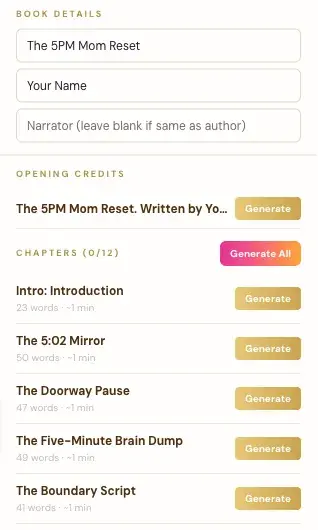
- The Audiobooks tab opens with your book's title, your author name and your chapters already filled in.
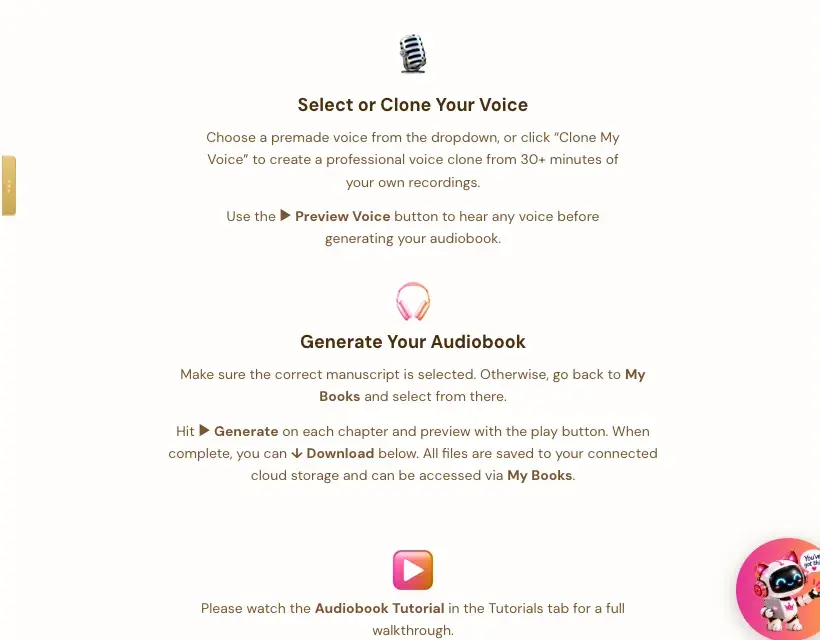
The app says it right on the page: "Make sure the correct manuscript is selected. Otherwise, go back to My Books and select from there."
What Does the Audiobook Creator Pull From My Book?
- Book Details: your title and author name from the manuscript. There's also a Narrator box. Leave it blank if the narrator is the same as the author.
- Opening Credits: a line like "The 5PM Mom Reset. Written by…", with its own Generate button.
- Chapters: one row for each intro section and each chapter in your manuscript, with its word count and about how many minutes it will run. The heading shows how many are done, like "Chapters (0/12)."
How Do I Make the Audio?
- Pick a voice from the dropdown, or click 🎤 Clone My Voice to make a voice clone from 30 or more minutes of your own recordings.
- Click ▶ Preview Voice to hear any voice before you start.
- Click ▶ Generate on each chapter, or Generate All.
- Preview each chapter with the play button, then ⬇ Download.
What Do I Need Before I Start?
The app asks for two connections:
- Your own ElevenLabs account and API key. ElevenLabs is a separate service with its own plans. Its Free plan doesn't allow audio through its API, so you need at least their Creator plan. Connecting your key takes a few seconds, and the app guides you.
- Your own storage: Google Drive, Dropbox or OneDrive. See Where Your Audiobook Files Go.
What If I Change My Manuscript Later?
If you edit a chapter after you've made its audio, generate that chapter again. A regenerated clip replaces the old one in your storage, so you don't get duplicates.
Step 2: Find Your Audio Files
Every audio file you make is saved straight into your own Google Drive, Dropbox or OneDrive. Your audiobook files stay yours, whether or not you keep using the app.
Where Do My Audiobook Files Go?
The app creates a Golden Bestseller Empire folder once in your storage. Inside it, there's a folder named after that exact book, and inside that, an Audio folder. You don't have to do anything to set this up.
Why Does It Save to My Own Storage?
On purpose. You own your audio files and can reach them without us. The app says: "All files are saved to your connected cloud storage and can be accessed via My Books."
What If I Haven't Connected Storage?
The first time you click Generate, a Choose your storage platform screen appears. Pick Google Drive, Dropbox or OneDrive and sign in. You only do it once, and every audiobook after that uses the same connection. See How to Connect Cloud Storage.
What If I Generate a Chapter Again?
The new version replaces the old one, so you don't get duplicate files.
Can I Use Save to This Computer for Audio?
Audio goes to Google Drive, Dropbox or OneDrive. A folder on your own computer is for your book backups. See Saving, Google Drive and Your Computer.
Step 3: Know What to Do About Audible and ACX
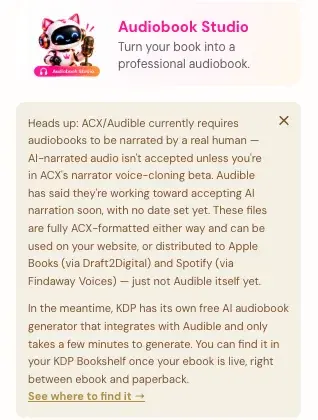
ACX and Audible currently need audiobooks narrated by a real human, unless you're in ACX's narrator voice-cloning beta. The files from the Audiobook Creator are fully ACX-formatted, and they work in other places.
Can I Sell My Audiobook on Audible?
Not yet with AI narration. The app says: "ACX/Audible currently requires audiobooks to be narrated by a real human. AI-narrated audio isn't accepted unless you're in ACX's narrator voice-cloning beta. Audible has said they're working toward accepting AI narration soon, with no date set yet."
Where Can I Use My Audiobook Files?
The app says the files are fully ACX-formatted either way, and can be used:
- on your website
- on Apple Books, through Draft2Digital
- on Spotify, through Findaway Voices
Just not on Audible itself yet.
Is There Another Way to Get an Audiobook on Audible?
The app says KDP has its own free AI audiobook generator that works with Audible and only takes a few minutes. You can find it in your KDP Bookshelf once your ebook is live, right between ebook and paperback.
Where Can I Read More About Audible and ACX?
See Audible, ACX and Your Audiobook Files Explained.
Where Can I Read More About KDP?
See How to Publish on KDP and Amazon KDP Publishing Guidelines.
What Comes Next?
See How to Connect Cloud Storage. Not sure where to start? The Course Coach inside the app guides you through every step, so you're never stuck on a button. Back to Step 4 · WRITE.
Related Tutorials
Last checked in the app: October 14, 2026.
Still Need Help?
Inside the app, the Course Coach answers your questions and guides you step by step. You can also write to us and we will get back to you.
Contact Support