
How to Clone Your Own Voice for Your Audiobook: Upload or Record 30 Minutes
Click Clone My Voice, name your voice, then upload files or record. ElevenLabs needs at least 30 minutes of clear audio.
You can narrate your audiobook in your own voice. Click Clone My Voice, then upload recordings or record right in the app. You need at least 30 minutes of clear audio.
Where Is the Clone My Voice Button?
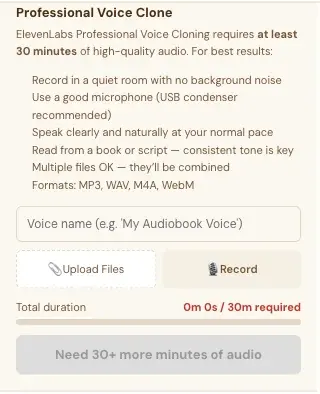
Open the Audiobooks tab. Near the top, under the voice dropdown and Preview Voice, you'll find the pink 🎤 Clone My Voice button. Click it to open the Professional Voice Clone panel. Click it again to close the panel.
How Much Audio Do I Need?
At least 30 minutes. The panel says: "ElevenLabs Professional Voice Cloning requires at least 30 minutes of high-quality audio."
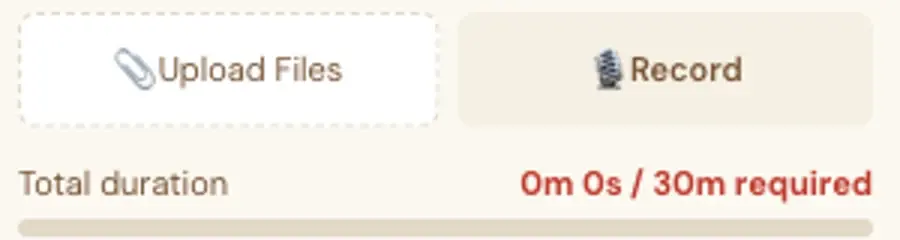
A counter shows your Total duration, like "0m 0s / 30m required." Until you reach 30 minutes, the big button at the bottom is grey and says "Need 30+ more minutes of audio."
What Are the Recording Tips?
The panel lists them:
- Record in a quiet room with no background noise.
- Use a good microphone (a USB condenser is recommended).
- Speak clearly and naturally at your normal pace.
- Read from a book or script. A consistent tone is key.
- Multiple files are OK. They'll be combined.
- Formats: MP3, WAV, M4A, WebM.
How Do I Add My Recordings?
- Type a name in the Voice name box, for example "My Audiobook Voice."
- Click 📎 Upload Files to add recordings you already have, or click 🎙 Record to record straight from your microphone.
- Watch the Total duration counter reach 30 minutes.
When your browser asks to use your microphone, click Allow. Your recordings go to ElevenLabs to build the voice.
What Does It Cost?
Voice cloning runs on your own ElevenLabs account. ElevenLabs' Free plan doesn't allow audio through its API, so you need their Creator plan or higher. ElevenLabs bills you directly. See How to Set Up the Audiobook Creator.
What Comes Next?
Pick your voice and generate your chapters: How to Choose or Clone a Voice for Your Audiobook. Not sure where to start? The Course Coach inside the app guides you through every step, so you're never stuck on a button.
Related Articles
Last checked in the app: October 14, 2026.
Still Need Help?
Inside the app, the Course Coach answers your questions and guides you step by step. You can also write to us and we will get back to you.
Contact Support