
Where Does My Translated Book Go? It Lands in My Books as Its Own Manuscript
When the Global Book Translator finishes, your translation comes back as its own new book in My Books, ready to open in the Writing Studio.
When the Global Book Translator in Step 8 · EXPAND finishes, your translated book comes back as its own new manuscript in My Books. Your original book stays exactly as it was.
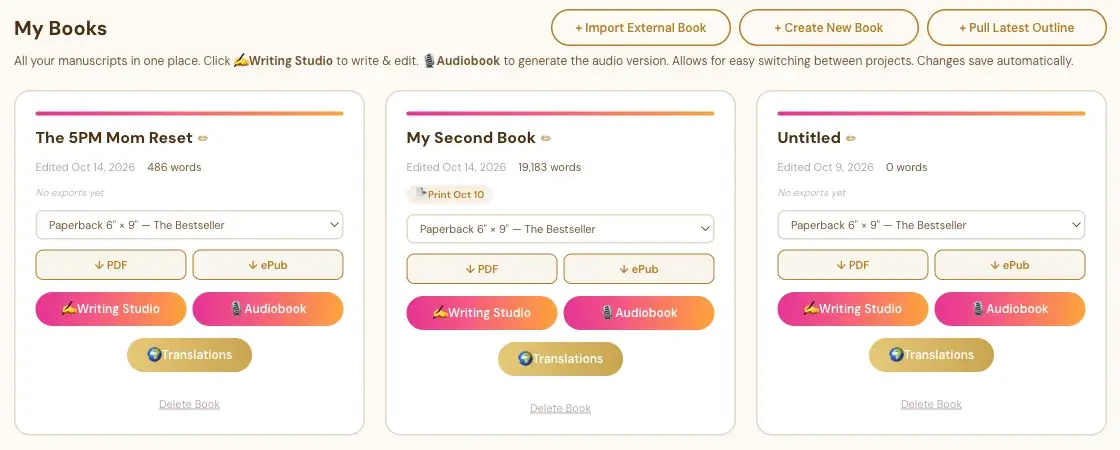
Where Does My Translation Show Up?
Open the My Books tab. Your translated book is there as a new card, next to your original. It's a real, full book. You can open it in the Writing Studio, edit it, and export it as a PDF or ePub like any other book.
The translation is marked as a translation of your original, so the app knows which book it came from.
What Is Different on a Translated Book's Card?
A translated book's card shows 📝 Translator's Notes where your original has the Translations button. The notes show how your book was localized, and you can use Change this to adjust one choice. See Translator's Notes and the Change This Button.
Does the Translation Copy My ISBNs?
No. ISBNs are not copied to the translation. Enter the ISBNs for the translated edition on its own Front End tab.
Which Title Does the Translated Book Get?
If you used the Title Localizer in Step 8, the title you chose there wins.
How Do I See All the Translations of One Book?
On your original book's card, click Translations. It opens a page that lists each language with either View translated book or "No translation yet." See What the Translations Button Does in My Books.
Does a Translation Also Translate My Front Pages?
The Front End tab has its own Translate button for your title page, impressum and other front matter, and it needs your API key. See How to Translate Your Front Matter.
What Comes Next?
See How Do I Translate My Whole Book With the Global Book Translator?. Not sure where to start? The Course Coach inside the app guides you through every step, so you're never stuck on a button.
Related Articles
Last checked in the app: October 14, 2026.
Still Need Help?
Inside the app, the Course Coach answers your questions and guides you step by step. You can also write to us and we will get back to you.
Contact Support