
Quick Start Guide: The Eight Steps From Idea to Published Book
A quick start for Golden Bestseller Empire: the eight steps, what each one does and where to begin, from your first idea to a published book.
Golden Bestseller Empire takes you from idea to published book in 8 steps: FIND, PLAN, BUILD, WRITE, GROW, PREP, LAUNCH and EXPAND. You bring the book, and the Course Coach helps you every step of the way. This guide shows what each step does, which tools are inside it, and what you leave with.
Quick Start
- Log in and watch the Welcome Video. A real quick orientation video, "Welcome & Full App Walk-through", pops up when you log in until you have watched it. You can watch it again any time on the Dashboard tab.
- Open the Roadmap. Click Roadmap in the top menu. Every step has a button that takes you to its tools.
- Begin with Step 1 · FIND, even if you think you know your topic. The most common mistake is jumping straight to the Book Planner.
- Move one step at a time. Each step hands off to the next. Step 4 · WRITE and Step 5 · GROW run side by side, so you can build your fanbase while you write. All 8 steps are available right away, and the order below is the recommended path.
- Connect your own AI key when the app asks. It is super easy, it takes only a few seconds, and the app guides you step by step. See Connect Your AI Key: It Takes a Few Seconds.
- Ask the Course Coach any time you are not sure what comes next.
Full Guide
Before you begin: what do I need?
- Your account. Log in and open your Roadmap.
- Your own AI key, when asked. The Writing Coach, Section Editor and Final Editor use your own Claude, Gemini or ChatGPT key. You connect it once, and it is free or costs very little. Gemini even has a free tier. The first time a tool needs a connection, a prompt tells you.
Each step also has a Roadmap page, a short overview with a button into its lessons or tool. The first time you click a STEP tab on the left, you see that overview. After you click its button, later clicks on the tab go straight to the lessons or tool. To read an overview again, click Roadmap in the top menu and then the step's number (1 to 8).
On a lesson page, the video is at the top and the tool sits further down, below the notes box. Click the pink Scroll down to the Generator link under the video to jump to it.
Step 1 · FIND: Find Your Signature Topic
"What could you be known for?"
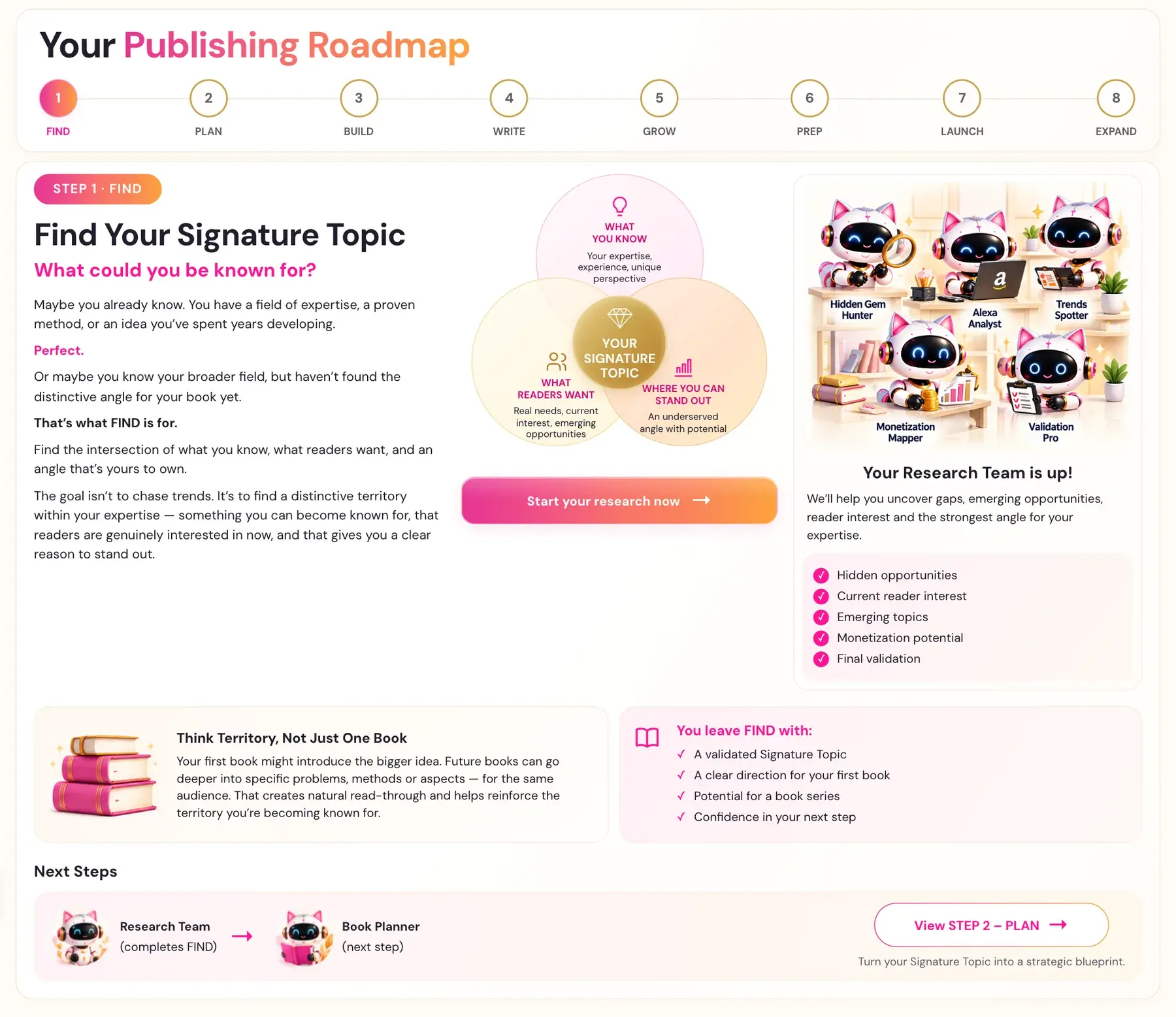
Maybe you already know. You have a field of expertise, a proven method, or an idea you’ve spent years developing.
Perfect.
Or maybe you know your broader field, but haven’t found the distinctive angle for your book yet.
That’s what FIND is for.
Find the intersection of what you know, what readers want, and an angle that’s yours to own.
The goal isn’t to chase trends. It’s to find a distinctive territory within your expertise — something you can become known for, that readers are genuinely interested in now, and that gives you a clear reason to stand out.
WHAT YOU KNOW + WHAT READERS WANT + WHERE YOU CAN STAND OUT = YOUR SIGNATURE TOPIC
Click Start your research now → to open the Step 1 tools.
Your Research Team is up! We’ll help you uncover gaps, emerging opportunities, reader interest and the strongest angle for your expertise.
- ✓ Hidden opportunities
- ✓ Current reader interest
- ✓ Emerging topics
- ✓ Monetization potential
- ✓ Final validation
Step 1 has five generators. Run them in order.
- Hidden Gem Gold Mine: Scans the top 20 bestselling books in your niche and finds the 10 biggest "Action Gaps", which are specific things readers consistently wanted but didn't get. It then generates 5 to 10 tailored book angle ideas and recommends a winner.
- Alexa for Shopping Gap Finder: Acts as Alexa for Shopping, Amazon's AI shopping assistant, trying to answer a real buyer's question, and shows exactly where no existing book fully answers the need. It also gives you 3 positioning statements, short phrases for your title, subtitle or description.
- Viral Topic Gap: Finds exactly 10 emerging cultural movements in your niche that are exploding online but have no comprehensive, high-authority book dedicated to them yet.
- Monetization Gap: Finds real paid products in your niche, such as Udemy courses and paid Substack newsletters, with a separate section on paid Skool groups, and gives a verdict on whether your niche is monetizable. The Substack writers are also potential collaboration and shoutout partners at launch.
- Final Validation: Checks whether Substack communities are actively discussing and requesting your specific topic, and whether a book on this exact topic has been published on Amazon in the last 12 months. The verdict is GO, REFINE or RECONSIDER. A REFINE does not mean abandon the topic. It means adjust the angle.
After Final Validation, Discuss your topic with your preferred AI creates a copyable discussion prompt. You enter your background and the topics you are considering, optionally include saved Step 1 reports from your project, review the complete prompt, copy it, and paste it into the AI you like best. This helper does not run AI or use tokens in Golden Bestseller Empire. A chosen topic then goes to the Book Planner, and nothing changes the Planner automatically.
Think Territory, Not Just One Book. Your first book might introduce the bigger idea. Future books can go deeper into specific problems, methods or aspects — for the same audience. That creates natural read-through and helps reinforce the territory you’re becoming known for.
You leave FIND with:
- ✓ A validated Signature Topic
- ✓ A clear direction for your first book
- ✓ Potential for a book series
- ✓ Confidence in your next step
Next Steps: Your Research Team hands off to the Book Planner. Click View STEP 2 – PLAN → to turn your Signature Topic into a strategic blueprint.
Step 2 · PLAN: Create Your Book Blueprint
"Where do you want this book to take your reader — and you?"
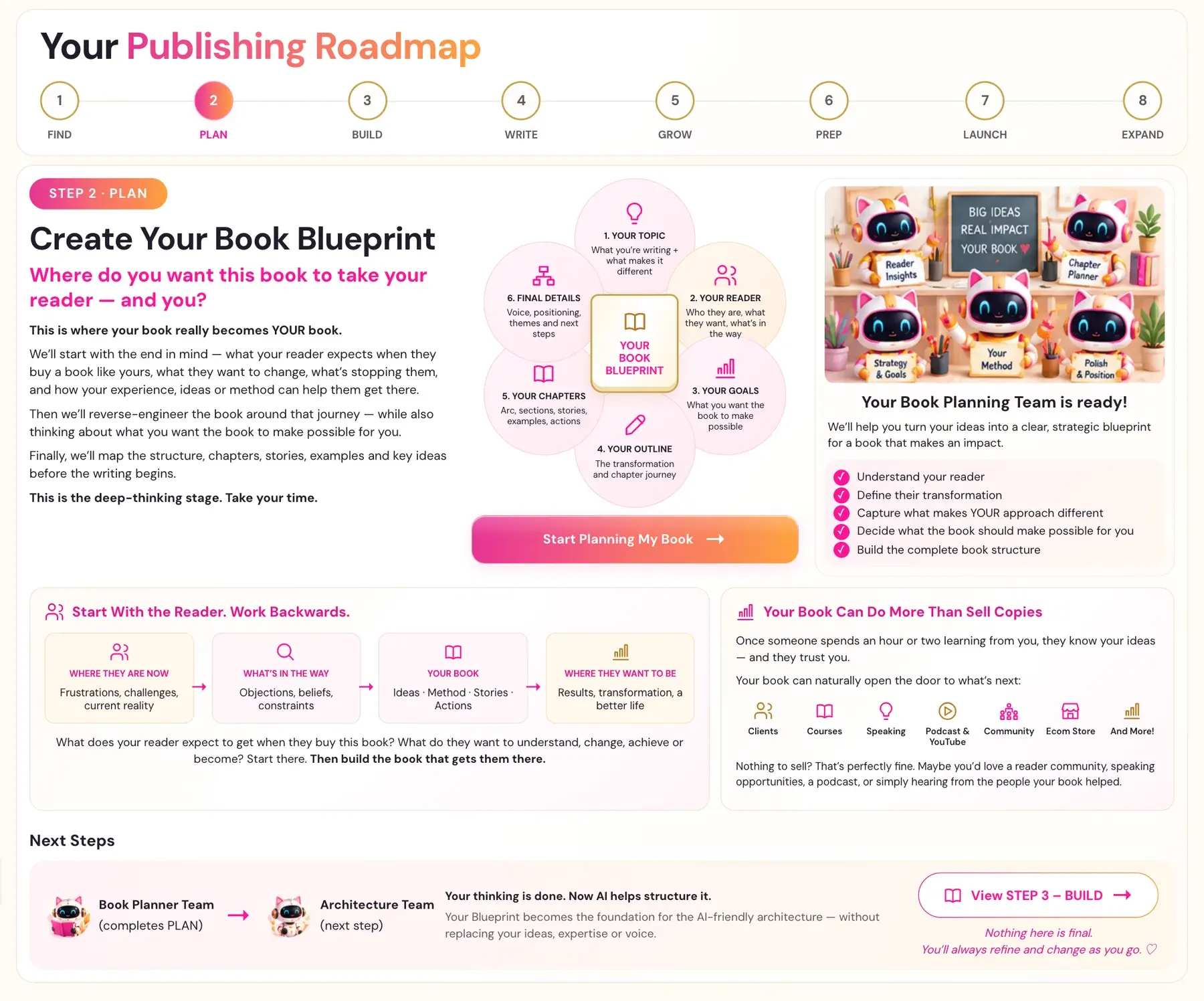
This is where your book really becomes YOUR book.
We’ll start with the end in mind — what your reader expects when they buy a book like yours, what they want to change, what’s stopping them, and how your experience, ideas or method can help them get there.
Then we’ll reverse-engineer the book around that journey — while also thinking about what you want the book to make possible for you.
Finally, we’ll map the structure, chapters, stories, examples and key ideas before the writing begins.
This is the deep-thinking stage. Take your time. For the Book Planner, take your time with it, possibly even a few days.
The Blueprint has six parts:
- YOUR TOPIC: What you're writing and what makes it different.
- YOUR READER: Who they are, what they want and what's in the way.
- YOUR GOALS: What you want the book to make possible.
- YOUR OUTLINE: The transformation and chapter journey.
- YOUR CHAPTERS: Arc, sections, stories, examples and actions.
- FINAL DETAILS: Voice, positioning, themes and next steps.
YOUR BOOK BLUEPRINT comes at the end. Click Start Planning My Book → to begin.
Your Book Planning Team is ready! We’ll help you turn your ideas into a clear, strategic blueprint for a book that makes an impact.
- ✓ Understand your reader
- ✓ Define their transformation
- ✓ Capture what makes YOUR approach different
- ✓ Decide what the book should make possible for you
- ✓ Build the complete book structure
Start With the Reader. Work Backwards. WHERE THEY ARE NOW → WHAT’S IN THE WAY → YOUR BOOK → WHERE THEY WANT TO BE. What does your reader expect to get when they buy this book? What do they want to understand, change, achieve or become? Start there. Then build the book that gets them there.
Your Book Can Do More Than Sell Copies. Once someone spends an hour or two learning from you, they know your ideas — and they trust you. Your book can naturally open the door to what’s next. Nothing to sell? That’s perfectly fine. Maybe you’d love a reader community, speaking opportunities, a podcast, or simply hearing from the people your book helped.
The Book Planner is a guided conversation that asks you questions one at a time. Every answer is saved to your account the moment you hit Send, so you can leave and come back to exactly where you left off. You can go back with ← Previous and change any answer. If you are planning another book, an optional Reuse answers from a previous book control lets you choose which saved answers to bring in. Nothing is selected or applied automatically.
If you feel stuck, remember this is just a first version. Nothing is final, and even imperfect information is hugely helpful for mapping your book. Your Blueprint is also saved on the Step 2 tab of My Projects.
Next Steps: The Book Planner Team hands off to the Architecture Team. Your thinking is done. Now AI helps structure it. Your Blueprint becomes the foundation for the AI-friendly architecture — without replacing your ideas, expertise or voice. Click View STEP 3 – BUILD →.
Nothing here is final. You’ll always refine and change as you go. ♡
Step 3 · BUILD: Build Your AI-Friendly Book Architecture
"Will Amazon recommend your book?"
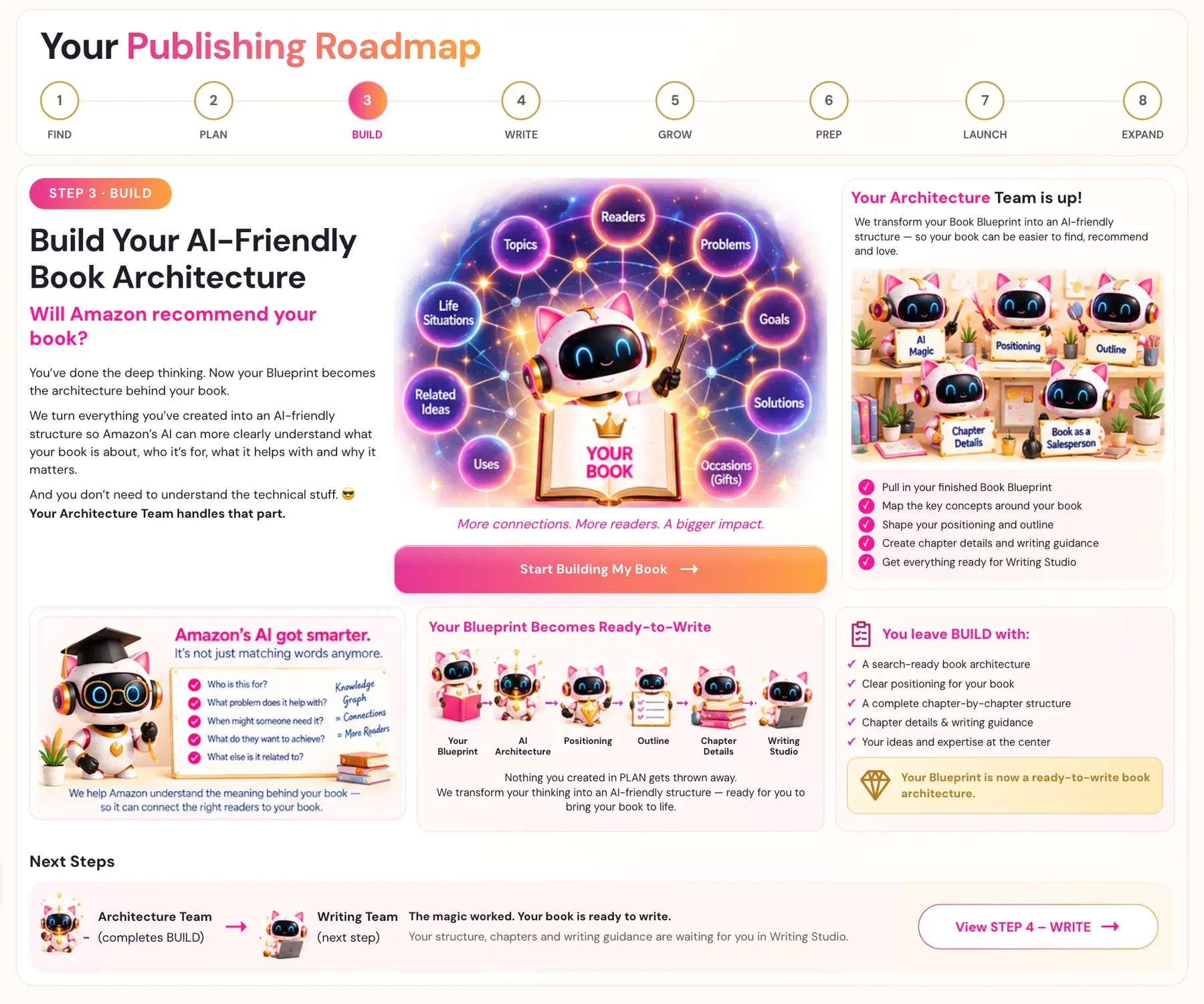
You’ve done the deep thinking. Now your Blueprint becomes the architecture behind your book.
We turn everything you’ve created into an AI-friendly structure so Amazon’s AI can more clearly understand what your book is about, who it’s for, what it helps with and why it matters.
And you don’t need to understand the technical stuff. 😎 Your Architecture Team handles that part.
More connections. More readers. A bigger impact.
Click Start Building My Book → to open the Step 3 generators.
Your Architecture Team is up! We transform your Book Blueprint into an AI-friendly structure — so your book can be easier to find, recommend and love.
- ✓ Pull in your finished Book Blueprint
- ✓ Map the key concepts around your book
- ✓ Shape your positioning and outline
- ✓ Create chapter details and writing guidance
- ✓ Get everything ready for Writing Studio
The generators work in this order:
- Knowledge Graph: Maps the key concepts around your book. This is the semantic foundation for the entire book, and it feeds every generator that follows.
- Big Promise: Crafts the hook and transformation promise for your specific reader.
- Book Outline: A full chapter-by-chapter outline with subheaders, chapter arc and story beats.
- Chapter Detail: Expands each chapter into detailed sections with writer's prompts, subheaders and goals. It creates writing directions for you, not drafted stories, scenes, dialogue or narrative. Keep the page open while it works.
Your Blueprint Becomes Ready-to-Write: Your Blueprint → AI Architecture → Positioning → Outline → Chapter Details → Writing Studio. Nothing you created in PLAN gets thrown away. We transform your thinking into an AI-friendly structure — ready for you to bring your book to life.
You leave BUILD with:
- ✓ A search-ready book architecture
- ✓ Clear positioning for your book
- ✓ A complete chapter-by-chapter structure
- ✓ Chapter details & writing guidance
- ✓ Your ideas and expertise at the center
Your Blueprint is now a ready-to-write book architecture.
Next Steps: The Architecture Team hands off to the Writing Team. The magic worked. Your book is ready to write. Your structure, chapters and writing guidance are waiting for you in Writing Studio. Click View STEP 4 – WRITE →.
Step 4 · WRITE: Bring Your Book to Life
"Let’s get to writing this Baby! 😉"
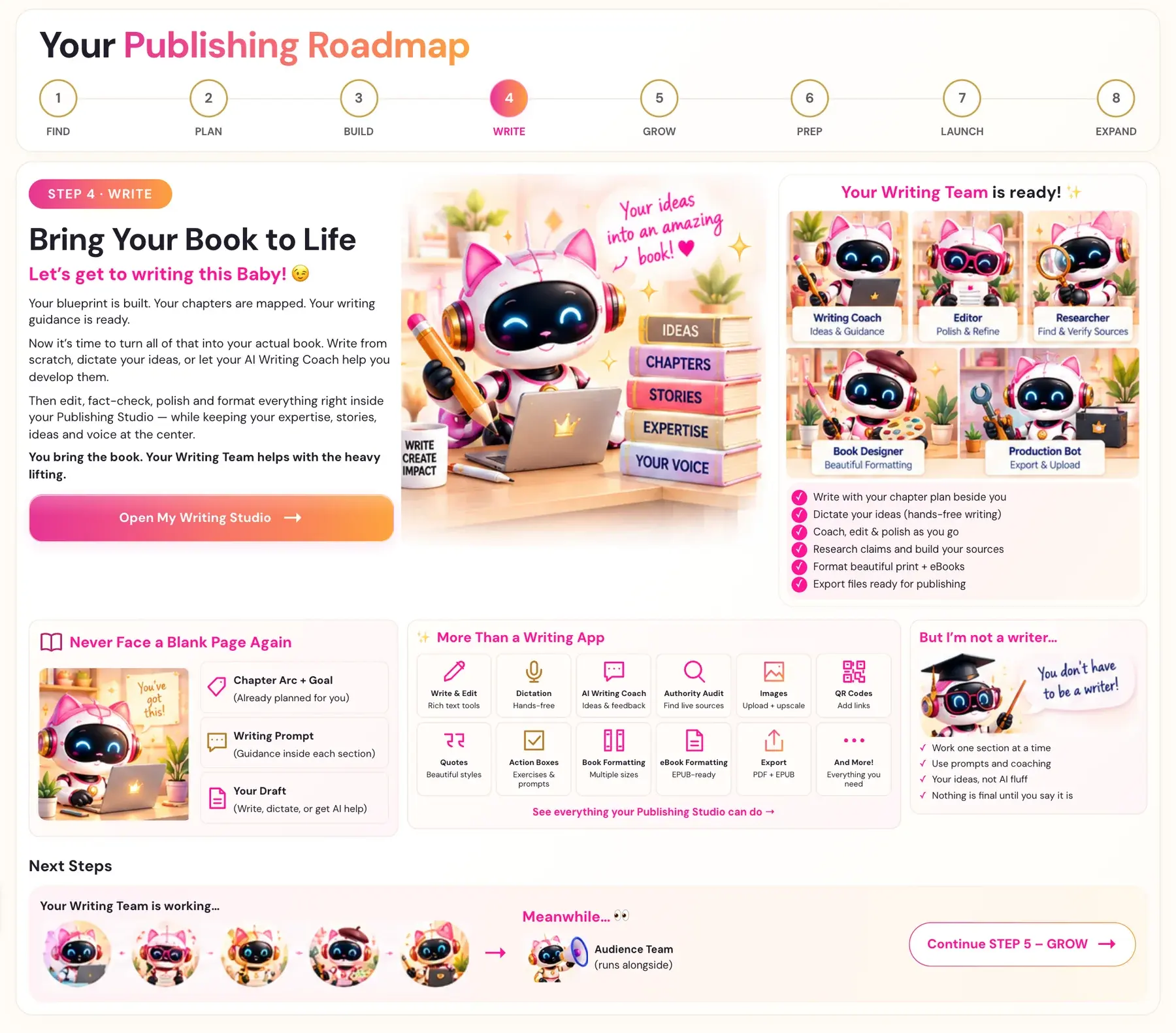
Your blueprint is built. Your chapters are mapped. Your writing guidance is ready.
Now it’s time to turn all of that into your actual book. Write from scratch, dictate your ideas, or let your AI Writing Coach help you develop them.
Then edit, fact-check, polish and format everything right inside your Publishing Studio — while keeping your expertise, stories, ideas and voice at the center.
You bring the book. Your Writing Team helps with the heavy lifting.
Click Open My Writing Studio →.
Your Writing Team is ready! ✨
- ✓ Write with your chapter plan beside you
- ✓ Dictate your ideas (hands-free writing)
- ✓ Coach, edit & polish as you go
- ✓ Research claims and build your sources
- ✓ Format beautiful print + eBooks
- ✓ Export files ready for publishing
Never Face a Blank Page Again. Each section has a Chapter Arc + Goal (already planned for you), a Writing Prompt (guidance inside each section), and Your Draft (write, dictate, or get AI help).
More Than a Writing App:
- Write & Edit: Rich text tools
- Dictation: Hands-free
- AI Writing Coach: Ideas & feedback. If you ask, it can also draft a section (or part of one) in your voice from your book details, and then invites you to adjust it.
- Authority Audit: Find sources to verify
- Images: Upload any PNG or JPG at any size. Every picture is prepared automatically for print, and a short ALT text description is required.
- QR Codes: Add links
- Quotes: Beautiful styles
- Action Boxes: Exercises & prompts
- Book Formatting: Multiple sizes
- eBook Formatting: EPUB-ready
- Export: PDF + EPUB
- And More! Everything you need
Inside the Writing Studio you also find Proofread (the spell check and grammar check), the Section Editor, and the Final Editor. Your work saves automatically as you type.
But I’m not a writer…
- ✓ Work one section at a time
- ✓ Use prompts and coaching
- ✓ Your ideas, not AI fluff
- ✓ Nothing is final until you say it is
Next Steps: Your Writing Team is working… Meanwhile… 👀 the Audience Team runs alongside. Click Continue STEP 5 – GROW →.
Step 5 · GROW: Build Your Fanbase Before You Launch
"Why wait until launch to find your readers?"
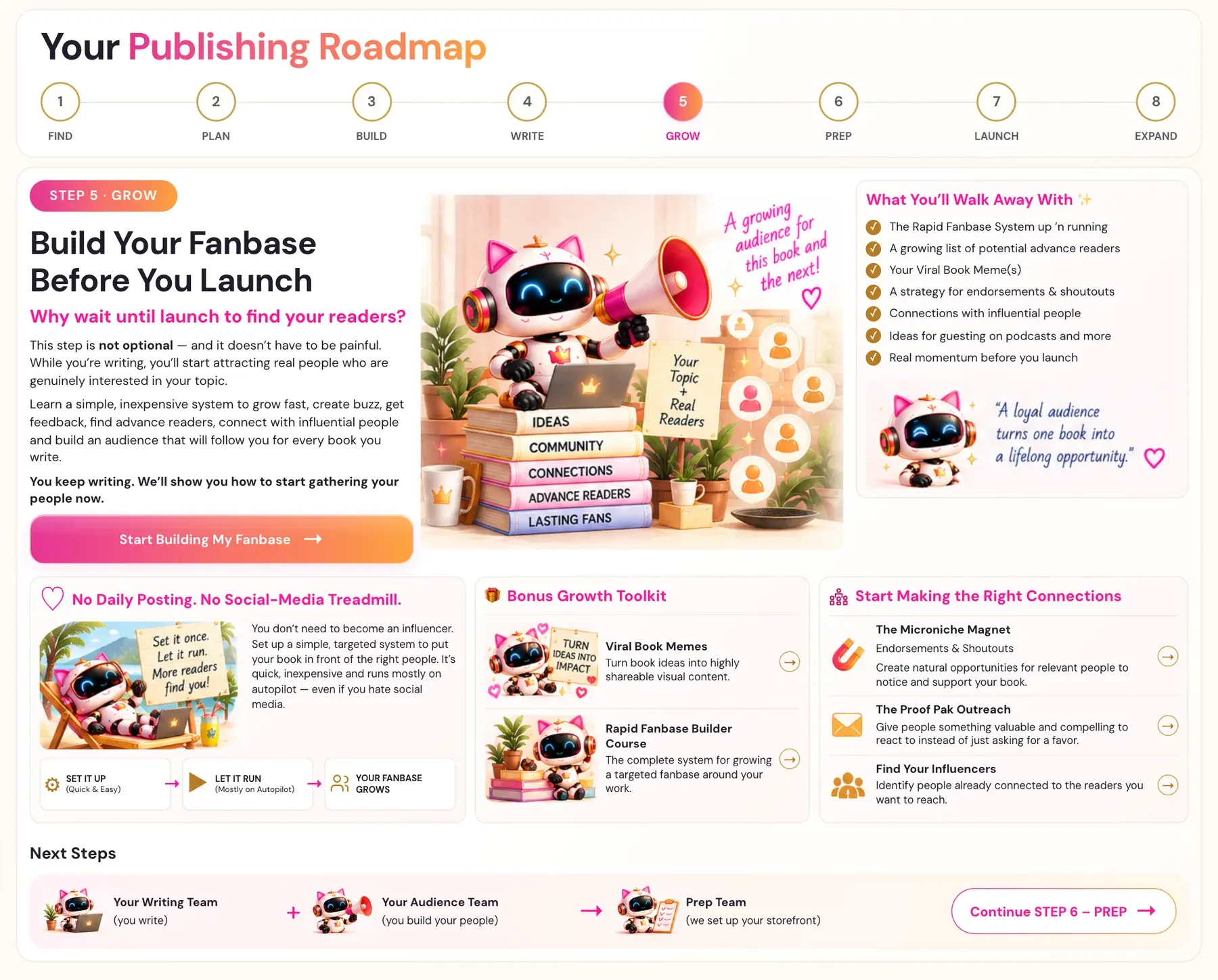
This step is not optional — and it doesn’t have to be painful. While you’re writing, you’ll start attracting real people who are genuinely interested in your topic.
Learn a simple, inexpensive system to grow fast, create buzz, get feedback, find advance readers, connect with influential people and build an audience that will follow you for every book you write.
You keep writing. We’ll show you how to start gathering your people now.
Click Start Building My Fanbase →.
What You’ll Walk Away With ✨
- ✓ The Rapid Fanbase System up ’n running
- ✓ A growing list of potential advance readers
- ✓ Your Viral Book Meme(s)
- ✓ A strategy for endorsements & shoutouts
- ✓ Connections with influential people
- ✓ Ideas for guesting on podcasts and more
- ✓ Real momentum before you launch
♡ No Daily Posting. No Social-Media Treadmill. You don’t need to become an influencer. Set up a simple, targeted system to put your book in front of the right people. It’s quick, inexpensive and runs mostly on autopilot — even if social media isn’t your thing. SET IT UP → LET IT RUN → YOUR FANBASE GROWS.
🎁 Bonus Growth Toolkit
- Viral Book Memes: Turn book ideas into highly shareable visual content.
- Rapid Fanbase Builder Course: The complete system for growing a targeted fanbase around your work.
Start Making the Right Connections
- The Microniche Magnet (Endorsements & Shoutouts): Create natural opportunities for relevant people to notice and support your book.
- The Proof Pak Outreach: Give people something valuable and compelling to react to instead of just asking for a favor.
- Find Your Influencers: Identify people already connected to the readers you want to reach.
Next Steps: Your Writing Team and your Audience Team hand off to the Prep Team. Click Continue STEP 6 – PREP →.
Step 6 · PREP: Build Your Storefront
"So Amazon recommends you & readers want you."
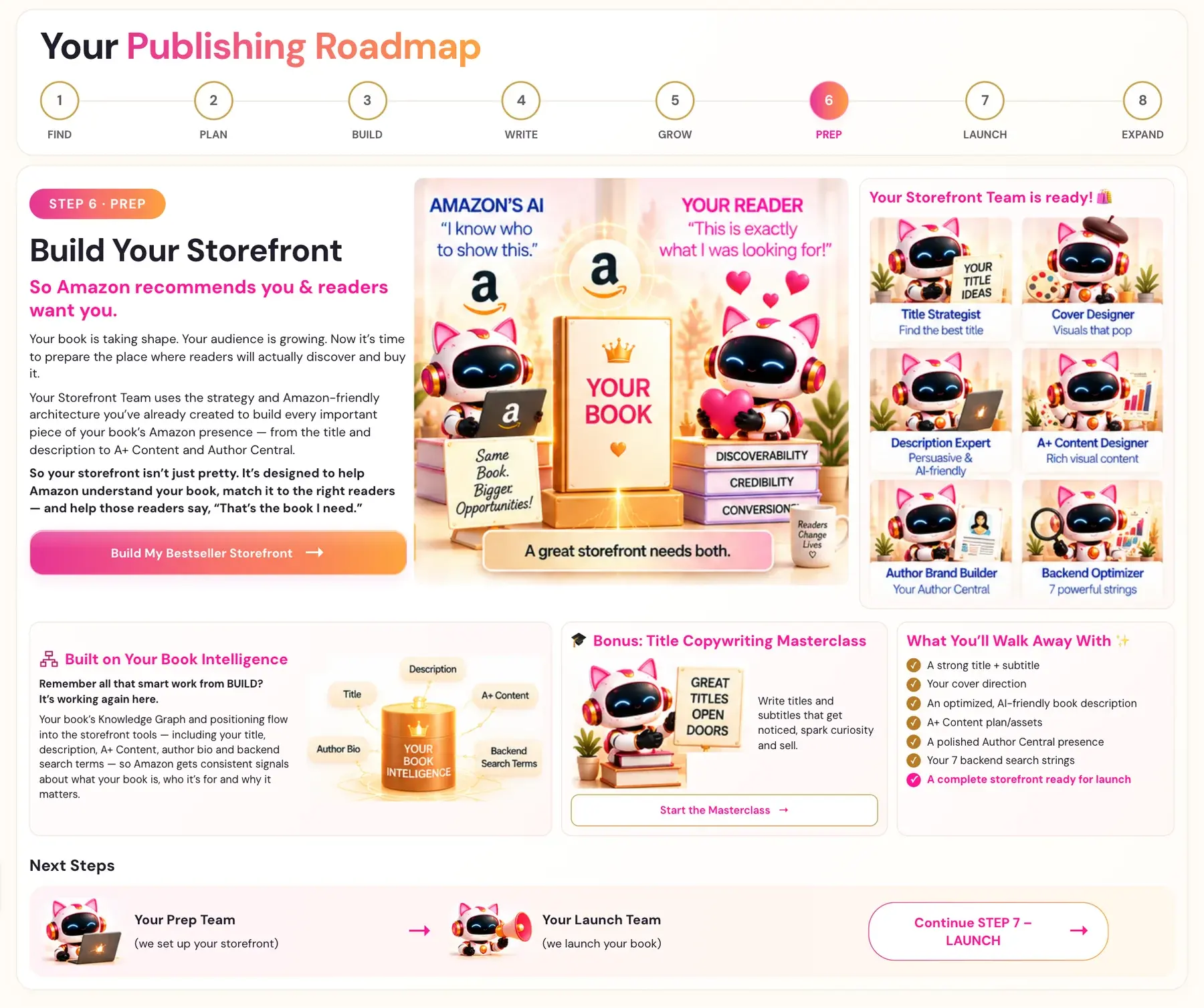
Your book is taking shape. Your audience is growing. Now it’s time to prepare the place where readers will actually discover and buy it.
Your Storefront Team uses the strategy and Amazon-friendly architecture you’ve already created to build every important piece of your book’s Amazon presence — from the title and description to A+ Content and Author Central.
So your storefront isn’t just pretty. It’s designed to help Amazon understand your book, match it to the right readers — and help those readers say, “That’s the book I need.”
Click Build My Bestseller Storefront →.
Your Storefront Team is ready! 🛍️ Your Title Strategist (find the best title), Cover Designer (visuals that pop), Description Expert (persuasive and AI-friendly), A+ Content Designer (rich visual content), Author Brand Builder (your Author Central) and Backend Optimizer (7 powerful strings).
Built on Your Book Intelligence. Remember all that smart work from BUILD? It’s working again here. Your book’s Knowledge Graph and positioning flow into the storefront tools — including your title, description, A+ Content, author bio and backend search terms — so Amazon gets consistent signals about what your book is, who it’s for and why it matters.
🎓 Bonus: Title Copywriting Masterclass. Write titles and subtitles that get noticed, spark curiosity and sell. Click Start the Masterclass →.
What You’ll Walk Away With ✨
- ✓ A strong title + subtitle
- ✓ Your cover direction
- ✓ An optimized, AI-friendly book description
- ✓ A+ Content plan/assets
- ✓ A polished Author Central presence
- ✓ Your 7 backend search strings
- ✓ A complete storefront ready for launch
Next Steps: Your Prep Team hands off to your Launch Team. Click Continue STEP 7 – LAUNCH →.
Step 7 · LAUNCH: Launch Your Book
"This is the moment it becomes real."
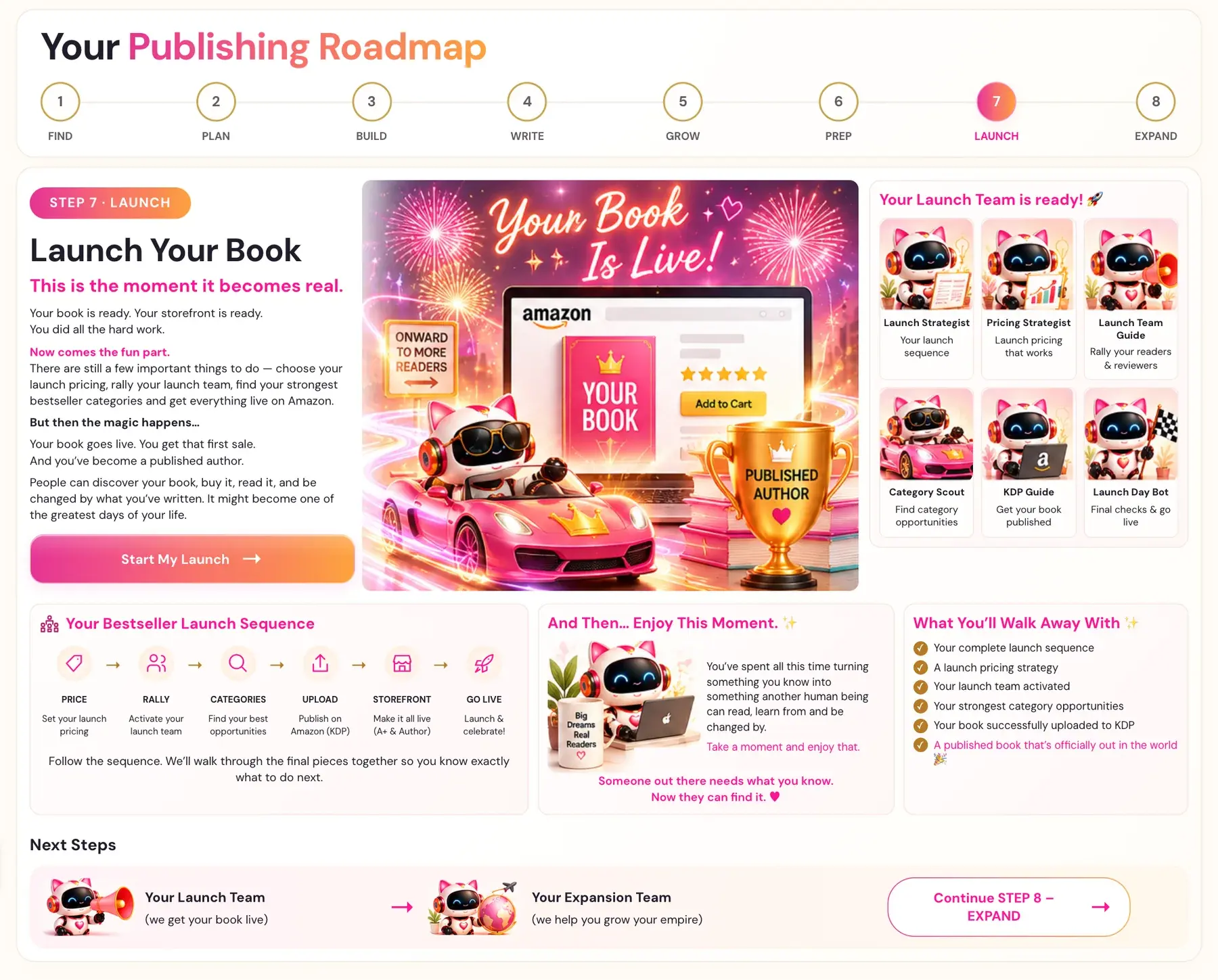
Your book is ready. Your storefront is ready. You did all the hard work.
Now comes the fun part. There are still a few important things to do — choose your launch pricing, rally your launch team, find your strongest bestseller categories and get everything live on Amazon.
But then the magic happens…
Your book goes live. You get that first sale. And you’ve become a published author.
People can discover your book, buy it, read it, and be changed by what you’ve written. It might become one of the greatest days of your life.
Click Start My Launch →.
Your Launch Team is ready! 🚀
- Launch Strategist: Your launch sequence
- Pricing Strategist: Launch pricing that works
- Launch Team Guide: Rally your readers & reviewers
- Category Scout: Find category opportunities
- KDP Guide: Get your book published
- Launch Day Bot: Final checks & go live
Your Bestseller Launch Sequence
- PRICE: Set your launch pricing →
- RALLY: Activate your launch team →
- CATEGORIES: Find your best opportunities →
- UPLOAD: Publish on Amazon (KDP) →
- STOREFRONT: Make it all live (A+ & Author) →
- GO LIVE: Launch & celebrate!
Follow the sequence. We’ll walk through the final pieces together so you know exactly what to do next.
The Category Scout generators may show a Connect your Scraper Key pop-up. That is a free key from ScraperAPI, a completely different key from your AI keys, used only for Category Scout and never required anywhere else in the course. Run Category Scout right before launch.
And Then… Enjoy This Moment. ✨ You’ve spent all this time turning something you know into something another human being can read, learn from and be changed by. Take a moment and enjoy that. Someone out there needs what you know. Now they can find it. ♥
What You’ll Walk Away With ✨
- ✓ Your complete launch sequence
- ✓ A launch pricing strategy
- ✓ Your launch team activated
- ✓ Your strongest category opportunities
- ✓ Your book successfully uploaded to KDP
- ✓ A published book that’s officially out in the world 🎉
Next Steps: Your Launch Team hands off to your Expansion Team. Click Continue STEP 8 – EXPAND →.
Step 8 · EXPAND: Take Your Book Further
"Your book is live. Now let’s see how far we can take it. ✨"
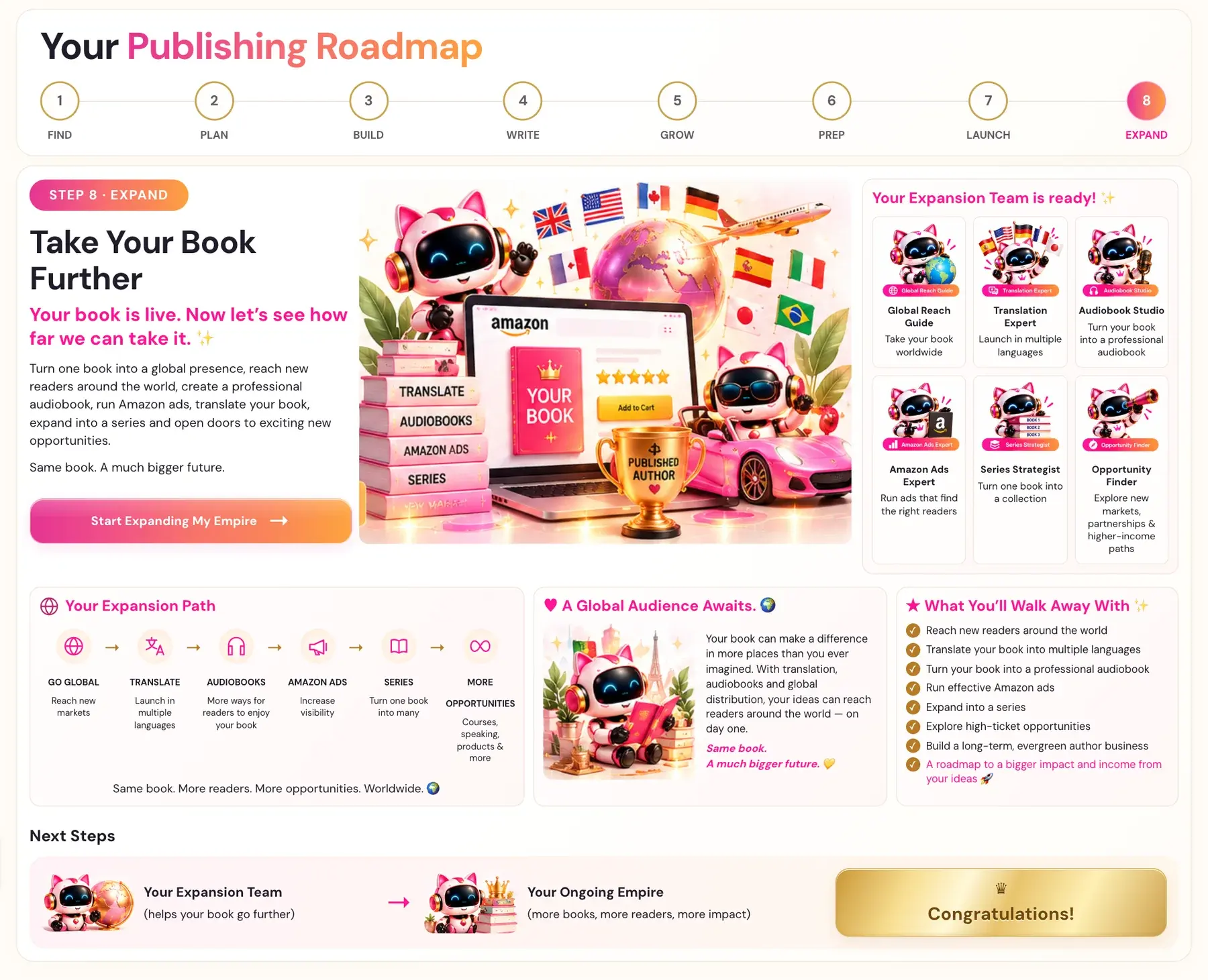
Turn one book into a global presence, reach new readers around the world, create a professional audiobook, run Amazon ads, translate your book, expand into a series and open doors to exciting new opportunities.
Same book. A much bigger future.
Click Start Expanding My Empire →.
Your Expansion Team is ready! ✨
- Global Reach Guide: Take your book worldwide
- Translation Expert: Launch in multiple languages
- Audiobook Studio: Turn your book into a professional audiobook
- Amazon Ads Expert: Run ads that find the right readers
- Series Strategist: Turn one book into a collection
- Opportunity Finder: Explore new markets, partnerships & higher-income paths
Your Expansion Path
- GO GLOBAL: Reach new markets →
- TRANSLATE: Launch in multiple languages →
- AUDIOBOOKS: More ways for readers to enjoy your book →
- AMAZON ADS: Increase visibility →
- SERIES: Turn one book into many →
- MORE OPPORTUNITIES: Courses, speaking, products & more
Same book. More readers. More opportunities. Worldwide. 🌍
Some of the tools inside this step:
- Amazon ads: The Amazon Ads Keyword Generator and the Campaign Strategy Generator.
- Translations: The Global Book Translator, plus the Title Localizer and the Sales Page Translation Generator to localize your title and sales page.
- Audiobooks: The Audiobook Creator uses ElevenLabs voices. ElevenLabs is the one key that has its own cost.
♥ A Global Audience Awaits. 🌍 Your book can make a difference in more places than you ever imagined. With translation, audiobooks and global distribution, your ideas can reach readers around the world — on day one.
★ What You’ll Walk Away With ✨
- ✓ Reach new readers around the world
- ✓ Translate your book into multiple languages
- ✓ Turn your book into a professional audiobook
- ✓ Run effective Amazon ads
- ✓ Expand into a series
- ✓ Explore high-ticket opportunities
- ✓ Build a long-term, evergreen author business
- ✓ A roadmap to a bigger impact and income from your ideas 🚀
Next Steps: Your Expansion Team feeds your Ongoing Empire. Congratulations!
Is the AI writing my book?
You bring the book. Your Writing Team helps with the heavy lifting. In Step 4 · WRITE, you write from scratch, dictate your ideas, or let your AI Writing Coach help you develop them, while keeping your expertise, stories, ideas and voice at the center. Nothing is final until you say it is. Authors must disclose AI-generated content when they upload to Amazon KDP. Read the exact rules in the KDP content guidelines and in Can You Publish AI Books on Amazon KDP?
Troubleshooting
I cannot find the tool on a lesson page. Scroll down past the video and the notes box, or click the pink Scroll down to the Generator link under the video. Lessons with no generator do not show it.
A Roadmap page seems to have disappeared. After you start a step, its STEP tab goes straight to the lessons. Click Roadmap in the top menu, then the step's number, to see the overview again.
I skipped the Welcome Video. Nothing is locked. It is always on the Dashboard tab.
I am overwhelmed by the Book Planner. That is totally normal at this stage. It is a first version, nothing is final, and the Course Coach will give you one clear next step.
A message says my AI is busy or I am out of credits. A busy message is an availability error, so wait about a minute and try once more. A credits message means your key works but your account needs credit. See What do I do if my AI says I am out of credits?
My text will not save. Keep the page open and click the retry button. See Why does it say "Not saved — retry"?
Where to Go Next
Start with Where do I start?, then learn your way around in How do I find my way around the app?. When a tool asks for a key, follow Connect Your AI Key: It Takes a Few Seconds. Official publishing rules are in the Amazon KDP Publishing Guidelines. Not sure where to start? The Course Coach inside the app helps you every step of the way.
Related Tutorials
Last checked in the app: October 14, 2026.
Still Need Help?
Inside the app, the Course Coach answers your questions and guides you step by step. You can also write to us and we will get back to you.
Contact Support