
How to Find Your Signature Topic With the Step 1 Research Generators
Run the five Step 1 generators in order, learn to read each report, and leave with a confirmed topic that is ready for the Book Planner.
Quick Start
Step 1 · FIND is called "Find Your Signature Topic". You run five research generators in order, then choose your topic.
- Open Step 1 and click Start your research now →.
- On each lesson, watch the video, then scroll down to the generator and fill in the boxes.
- Click Generate → and read the report. Run the five generators in this order: Hidden Gem Gold Mine, Alexa for Shopping Gap Finder, Viral Topic Gap, Monetization Gap, Final Validation.
- Write down the topic you are choosing, plus the three positioning phrases from the Alexa for Shopping report.
- Take your topic to The Book Planner (Step 2 · PLAN).
Full Guide
Step 1: Understand what you are looking for
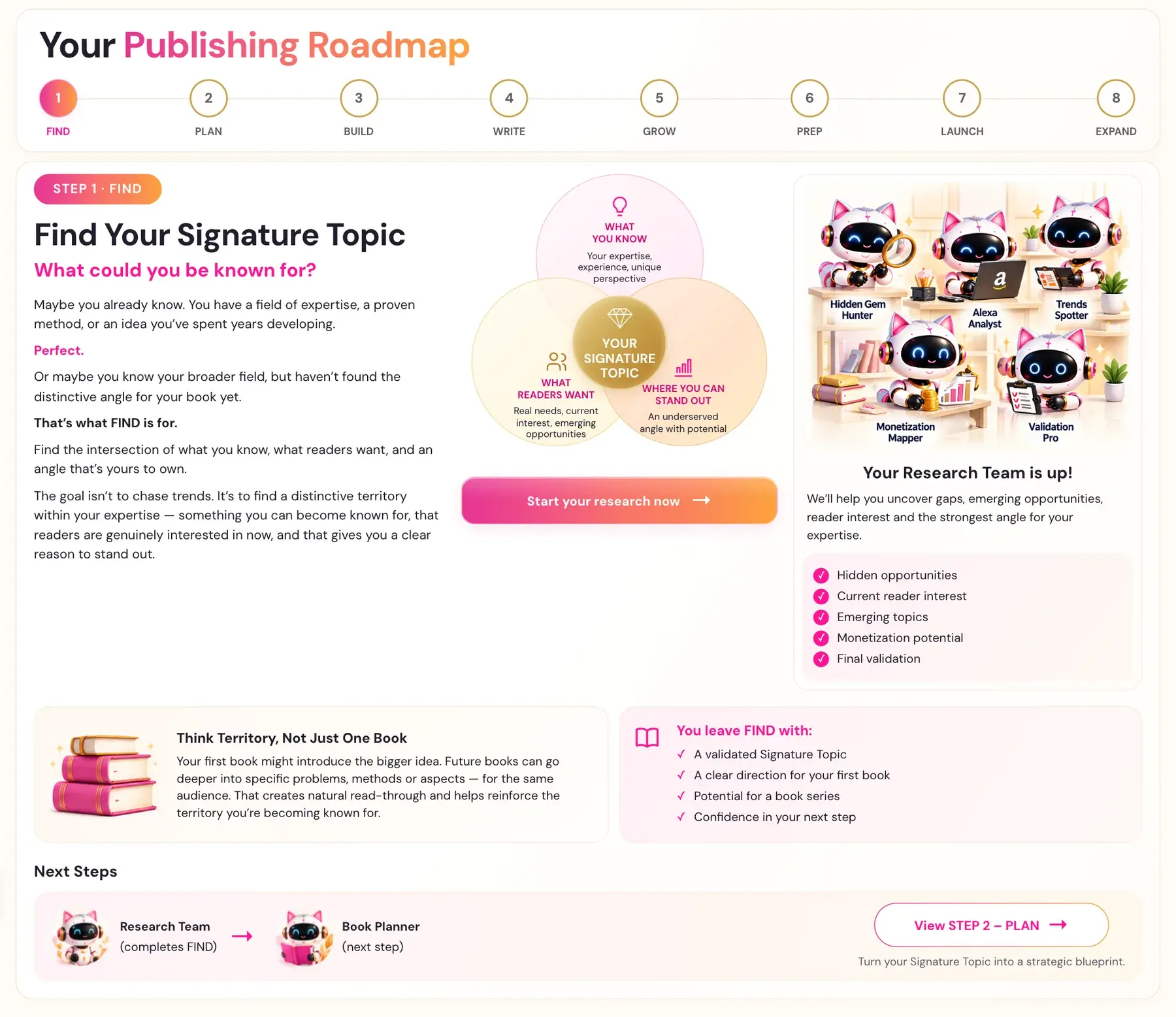
The question at the top of Step 1 · FIND is "What could you be known for?" Maybe you already know. You have a field of expertise, a proven method, or an idea you have spent years developing. Or maybe you know your broader field, but have not found the distinctive angle for your book yet. That is what FIND is for.
Your Signature Topic sits where three things meet:
- What you know: your expertise, experience and unique perspective.
- What readers want: real needs, current interest and emerging opportunities.
- Where you can stand out: an underserved angle with potential.
The goal is not to chase trends. It is to find a distinctive territory within your expertise: something you can become known for, that readers are genuinely interested in now, and that gives you a clear reason to stand out. Think territory, not just one book. Your first book might introduce the bigger idea. Future books can go deeper into specific problems, methods or aspects, for the same audience.
Step 1 answers four questions before you write a single word:
- What are readers begging for that no current book delivers? (Action Gaps)
- Is the niche monetizable, meaning do people actually spend money here?
- Are there viral cultural movements in this niche that have no book yet?
- Is this specific topic still an open gap right now, or has someone already written it?
A topic can be passionate, popular, and completely non-monetizable. A topic can have great Action Gaps but already have a book published last month. Step 1 runs all four filters before any writing begins. This protects months of work.
Step 2: Do not skip Step 1, even if you know your topic
The most common mistake is jumping straight to the Book Planner. The right starting point is Step 1 · FIND, even if you think you know your topic.
- The Hidden Gem Gold Mine generator often surfaces a chapter angle or subtitle framing you had not considered.
- The Monetization Gap generator confirms the niche is monetizable, so you are not assuming it.
- The Final Validation generator confirms no one just published the exact same book. The cost of skipping it is a book that competes against a title published two months ago.
Step 3: Open the generators
On the Step 1 Roadmap page, click Start your research now →. The first time, it opens the first Step 1 lesson, the intro video. If you have been in Step 1 before, it takes you straight to the first Step 1 lesson that has a generator (Amazon's Hidden Gem Gold Mine) and scrolls down to the tool.
On every lesson that has a generator, the video is at the top and the generator, the actual tool, is further down the same page. Right under the video there is a pink link, ↓ Scroll down to the Generator ↓. Click it to scroll straight down to the tool. If you cannot find the tool, scroll down past the video and the notes box.
The first time a brand-new student opens any Step 1 generator, a popup asks you to name your project before you can generate. The name does not need to be a real book title. A working title, a nickname or "Book Project 1" is fine, and you can rename it anytime. The project keeps everything for this one book together.
You may also see a Connect your Gemini Key pop-up. Connecting your own AI key is super easy, takes only a few seconds, and the app guides you through it step by step. The cost of using your own key is free or minimal. See How do I connect my AI key?.
Step 4: Run Generator 1, Hidden Gem Gold Mine
Fill in three boxes: Your Niche, Your Ideal Reader and Your Expertise Area. If one is empty, the app names the missing field before Generate runs. Click Generate →.
The report has five parts: the top 20 bestsellers in your niche, the top 10 Action Gaps with frequency ratings (High, Medium or Low), an Opportunity Zone, five to ten book angle ideas, and a Recommended Winner. An Action Gap is a specific, actionable thing readers wanted but did not receive. Wrong: "Readers wanted more practical advice." Right: "Readers wanted real scripts for difficult conversations, not just theories about why communication matters."
Look at the Recommended Winner first, then read back through the Action Gaps to see why that angle wins. The book angle ideas are starting points. They can be refined, combined or used as inspiration. The exact title wording does not matter at this stage. What matters is the gap being addressed. Details: Hidden Gem Gold Mine.
Step 5: Run Generator 2, Alexa for Shopping Gap Finder
Use the same three boxes. The AI simulates Alexa for Shopping, Amazon's AI shopping assistant, from the inside. It tries to answer a real buyer's question, then identifies the exact moment its recommendation logic breaks down because no existing book fully answers the need. That is your Logic Gap.
The report has six parts: the buyer's request, the closest current matches and where they fail, three to five Logic Gaps with the exact search query the buyer would use, how your book fills the gap, 3 positioning statements, and a next step. Save the three positioning statements. They feed directly into your title and description work in Step 6 · PREP.
Follow the Next Step and test the search queries directly in Amazon with Alexa for Shopping. Details: Alexa for Shopping Gap Finder.
Step 6: Run Generator 3, Viral Topic Gap
This one has a single box, Your Niche. It always gives you exactly 10 movements, numbered 1 through 10, each with a Movement Name, The Trend and The Gap. The names feel instantly recognizable, like something a real person in your niche would say to a friend, such as "The 4PM Wall," "The Always-Fine Trap," "Rage Cleaning at Midnight" or "The Invisible Second Shift."
Scan all ten and notice which movement makes you immediately think, "Someone needs to write THAT book." That instinct matters. Then ask which movement you have the most to say about. The intersection of those two answers is the winner. This generator is also excellent for finding chapter angle ideas, even if you already have your topic confirmed. Details: Viral Topic Gap.
Step 7: Run Generator 4, Monetization Gap
Use the three boxes again. The report finds paid products in your niche to show whether people spend money here: 5 Udemy courses with prices, 3 to 5 paid Substack newsletters, a Monetization Verdict, your opportunity angle, and a Paid Skool Groups section.
Bookmark the Substack newsletters now. Paid newsletter writers have engaged, paying audiences in exactly the niche you are targeting, and they are potential collaboration and shoutout partners at launch. This generator deliberately leaves out Amazon books, because that check comes next, in Final Validation. Details: Monetization Gap.
Step 8: Run Generator 5, Final Validation
This generator uses two boxes: Your Niche and Your Specific Book Topic. The specific topic is your precise angle. For example, the niche is "stress management for working moms over 30" and the topic is "somatic nervous system regulation for working moms who can't leave their desk".
The report checks whether Substack communities are asking for this topic, whether a book on this exact topic has been published on Amazon in the last 12 months, and gives a Final Verdict:
- GO: Substack demand is confirmed and there is no direct Amazon competition in the last 12 months. Write this book.
- REFINE: demand exists but a competing book was just published. Sharpen your angle so your book is clearly differentiated.
- RECONSIDER: no demand and competition already exists. Pivot to a different angle from the first or third report.
A REFINE verdict does not mean abandon the topic. It means adjust the angle. Details: Final Validation.
Step 9: Decide, with your own AI if you like
After Final Validation, Discuss your topic with your preferred AI creates a copyable discussion prompt. Enter your background and experience and the topics you are considering. Optionally click Choose saved reports from this project and tick the reports to include. Click Create my discussion prompt, review or edit it, then click Copy discussion prompt and paste it into ChatGPT, Claude, Gemini or another AI. This helper does not run AI or consume tokens in Golden Bestseller Empire.
Step 10: Keep your notes and move on
Write down your chosen topic, your angle and the three positioning phrases. A chosen topic goes to the Book Planner, and nothing changes the Planner automatically, so take your chosen topic into The Book Planner (Step 2 · PLAN) yourself.
You leave Step 1 · FIND with a validated Signature Topic, a clear direction for your first book, potential for a book series, and confidence in your next step.
A few things to know about all five generators
- The outputs are inspiration and research data, not instructions. You choose your topic. Only write on a topic you genuinely know, have lived, or can research credibly.
- You can run a generator again when you want to explore another angle or revise your inputs. Results may overlap or repeat, and a completely different answer is not promised. New generations consume AI usage and remain subject to account limits.
- Your reports are saved. Reopen them from My Projects, in the Step 1 tab.
Troubleshooting
A message asks me to fill in missing fields. Fill in every box shown, then click Generate again. No AI request is made for blank boxes.
My saved inputs could not load. Reload the page before you edit, to protect the previous draft. If saving the inputs fails, keep the page open, copy your important text and use Retry saving inputs.
I see a connection error or HTTP 502. This can occasionally happen. Retry with the same inputs. If a completed report was saved, the same request brings it back without a new generation. If it is still running, wait a minute and then retry.
The report finished but did not save. Copy it, or keep the page open and click Retry saving. This does not use AI again. Save recovery expires after 24 hours.
The report failed completeness checks. The app makes at most one repair attempt. Repeated failures show an error rather than accepting an incomplete report, and your previous reports stay safe. Retry once. If it happens again, contact support at contact@goldenbestseller.com with the generator name and the error.
The generator gave me a topic I know nothing about. The outputs are inspiration, not instructions. Pick the idea you can write about with real knowledge.
I got RECONSIDER. RECONSIDER describes your current angle. Go back to the Action Gaps in the first report. One is likely still open. You may only need to shift your angle slightly.
Where to Go Next
When your topic is confirmed, start the Book Planner with How to Use the Book Planner. For a short overview of Step 1, see What is Step 1 (Find)?. Not sure where to start? The Course Coach inside the app guides you through each step, so you are never stuck on a button.
Related Tutorials
Last checked in the app: October 14, 2026.
Still Need Help?
Inside the app, the Course Coach answers your questions and guides you step by step. You can also write to us and we will get back to you.
Contact Support