
How to Grow Your Audience Before You Launch
A guide to Step 5 Grow: open the lessons, work through the Rapid Fanbase System and the connection lessons, and take notes as you go.
Quick Start
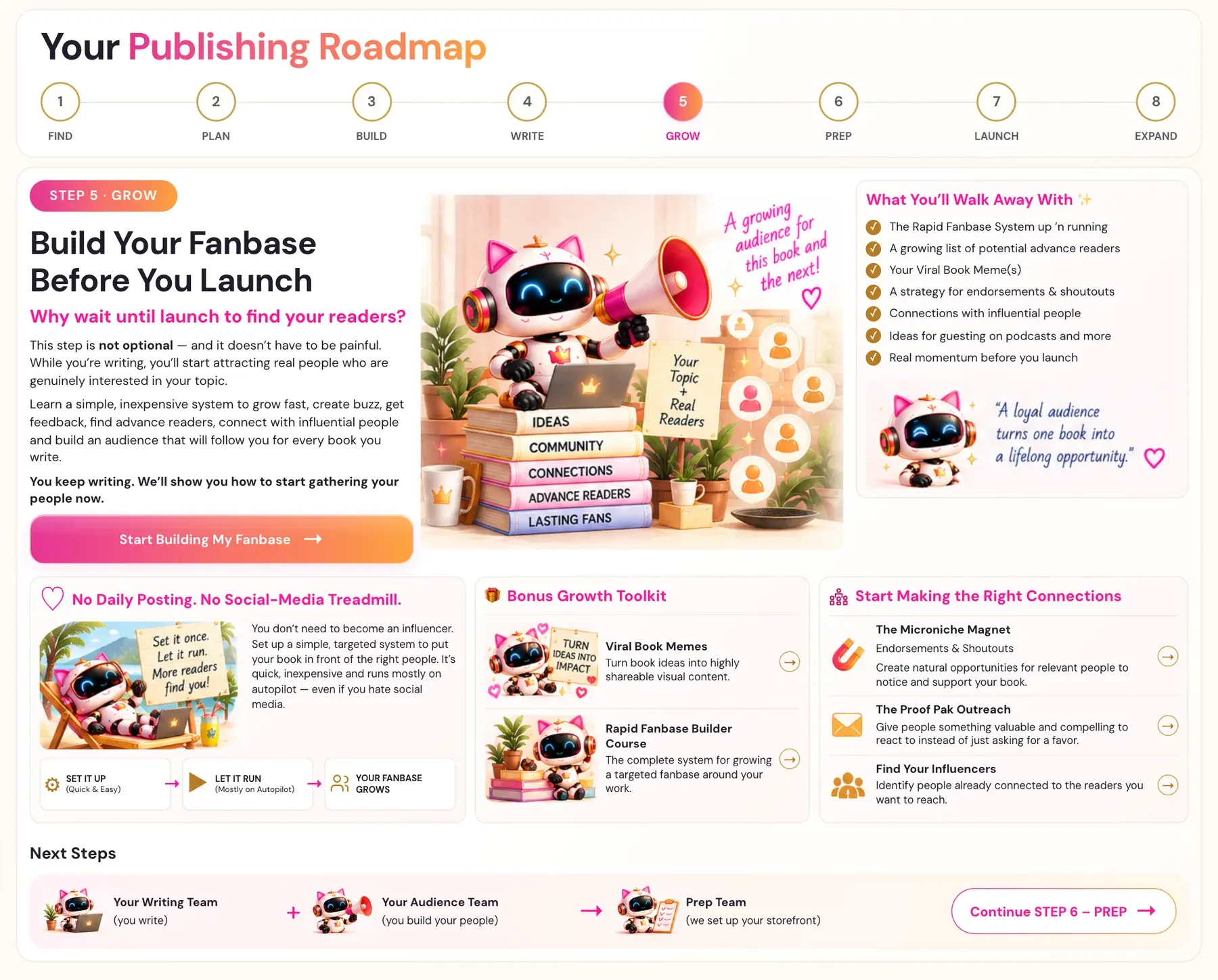
Step 5 · GROW is called "Build Your Fanbase Before You Launch." You keep writing, and the roadmap shows you how to start gathering your people now.
- Click STEP 5 · GROW in the left sidebar.
- On the roadmap page, click Start Building My Fanbase.
- Watch the lessons in the list, starting with "The Rapid Fanbase Builder".
- Use the notes box on each lesson ("Your notes for this lesson") to write down your notes.
- Click MARK COMPLETE → when you finish a lesson.
Full Guide
Step 1: Understand what Step 5 is for
The roadmap asks one question: "Why wait until launch to find your readers?" It says: "This step is not optional — and it doesn't have to be painful. While you're writing, you'll start attracting real people who are genuinely interested in your topic."
Step 5 teaches a simple, inexpensive system to grow fast, create buzz, get feedback, find advance readers, connect with influential people and build an audience that will follow you for every book you write. You keep writing. We'll show you how to start gathering your people now.
Under the heading "No Daily Posting. No Social-Media Treadmill.", the roadmap says you don't need to become an influencer. You set up a simple, targeted system to put your book in front of the right people. It's quick, inexpensive and runs mostly on autopilot, even if you dislike social media.
The process in three parts is: Set it up (quick and easy), Let it run (mostly on autopilot), and Your fanbase grows.
Step 2: Open the Step 5 roadmap page
- In the left sidebar, click STEP 5 · GROW.
- The first time you click a STEP tab, it opens that step's roadmap page. For Step 5 the page is titled "Build Your Fanbase Before You Launch".
- Read the page. It lists what you walk away with:
- - The Rapid Fanbase System up and running.
- - A growing list of potential advance readers.
- - Your Viral Book Meme(s).
- - A strategy for endorsements and shoutouts.
- - Connections with influential people.
- - Ideas for guesting on podcasts and more.
- - Real momentum before you launch.
- Click Start Building My Fanbase.
After you have started a step, every later click on its sidebar tab takes you straight to the lessons. To read the roadmap page again, click Roadmap in the top menu and then click the step's number across the top of the Roadmap page. The Roadmap menu always shows the roadmap pages.
Step 3: Learn how a lesson page works
Every Step 5 lesson page has the same parts.
- The video is at the top.
- The badge shows "In Progress" or "Completed".
- MARK COMPLETE → is the button that marks your lesson done.
- Your notes for this lesson is a box where you can type.
- Previous and next links move you through the lessons.
On a lesson that has a generator, the video is at the top and the generator is further down the same page, below the notes box. Right under the video there is a pink link, "↓ Scroll down to the Generator ↓", that takes you straight to it. Lessons with no generator do not show that link.
Step 4: Start with the Rapid Fanbase Builder
The roadmap box called Bonus Growth Toolkit holds two lessons.
- Viral Book Memes: turn book ideas into highly shareable visual content.
- Rapid Fanbase Builder Course: the complete system for growing a targeted fanbase around your work.
The first two lessons in the list are titled "The Rapid Fanbase Builder" and "The Rapid Fanbase Builder - Pt. 2". See What is the Rapid Fanbase System? and How do I use Viral Book Memes?.
The lesson list also includes "Your Launch Team", which connects to your advance readers. See How do I build a launch team?.
Step 5: Work through the connection lessons
The roadmap box Start Making the Right Connections has three lessons.
- The Microniche Magnet (Endorsements & Shoutouts): create natural opportunities for relevant people to notice and support your book. See What is the Microniche Magnet?.
- The Proof Pak Outreach: give people something valuable and compelling to react to instead of just asking for a favor. See What is Proof Pak Outreach?.
- Find Your Influencers: identify people already connected to the readers you want to reach. See How do I find my influencers?.
In the lesson list these are titled "The Microniche Magnet", "The "Proof Pak" Outreach" and "Finding Your Influencers". The details of each method are taught in the videos.
Step 6: Use what you found in Step 1
Your Step 1 research may already be useful here. The Course Coach points out that the paid Substack newsletters in your Monetization Gap and Final Validation reports can be promotional partners at launch. When you are ready to promote in Step 7, these writers are the first people to contact for shoutouts and features, and smart authors save them now. Those reports also have a separate section of paid Skool groups.
Paid newsletter offers can suggest topics people value, but they do not prove paid subscriber numbers or demand for your particular book.
Step 7: Keep writing
Step 5 runs alongside Step 4. On the roadmap, your Writing Team (you write) and your Audience Team (you build your people) work together. Together they hand off to the Prep Team, which builds your storefront in Step 6 · PREP.
Everything in the app is open from day one, so you can work on Step 5 whenever it suits you. The recommended order still gives you the best results.
Step 8: Use the notes box on each lesson
Each lesson has its own notes box, titled "Your notes for this lesson". Use it to write down your notes as you watch. On the My Projects page, the tabs read Step 1, Step 2, Step 3, Step 6, Step 7, Step 8 and Translation Versions. There is deliberately no Step 5 tab there, even though Step 5 · GROW is a real step in the sidebar and the Roadmap.
Step 9: Get ready for launch
The roadmap lists what you walk away with from Step 5:
- The Rapid Fanbase System up 'n running.
- A growing list of potential advance readers.
- Your Viral Book Meme(s).
- A strategy for endorsements and shoutouts.
- Connections with influential people.
- Ideas for guesting on podcasts and more.
- Real momentum before you launch.
Take those into Step 7, where you rally your launch team.
Troubleshooting
I clicked Step 5 and went straight to the lessons. Where is the roadmap page? Once you have started a step, its sidebar tab goes straight to the lessons. Click Roadmap in the top menu and then click the step's number across the top of the Roadmap page to see the roadmap page again.
I cannot find the tool on a lesson page. Scroll down past the video and the notes box, or click the pink link "↓ Scroll down to the Generator ↓" right under the video. Lessons with no generator do not show the link.
A step looks locked. Nothing in the app is locked. All eight steps are open from the start, and you can jump to any of them.
I am not sure which lesson to start with. The first lesson in the list is "The Rapid Fanbase Builder".
Where to Go Next
Continue with What is Step 6 (Prep)? to build your storefront, or read How to Build Your Amazon KDP Sales Page. You can ask the Course Coach inside the app any time you have a question about a button or a field.
Related Tutorials
Last checked in the app: October 14, 2026.
Still Need Help?
Inside the app, the Course Coach answers your questions and guides you step by step. You can also write to us and we will get back to you.
Contact Support